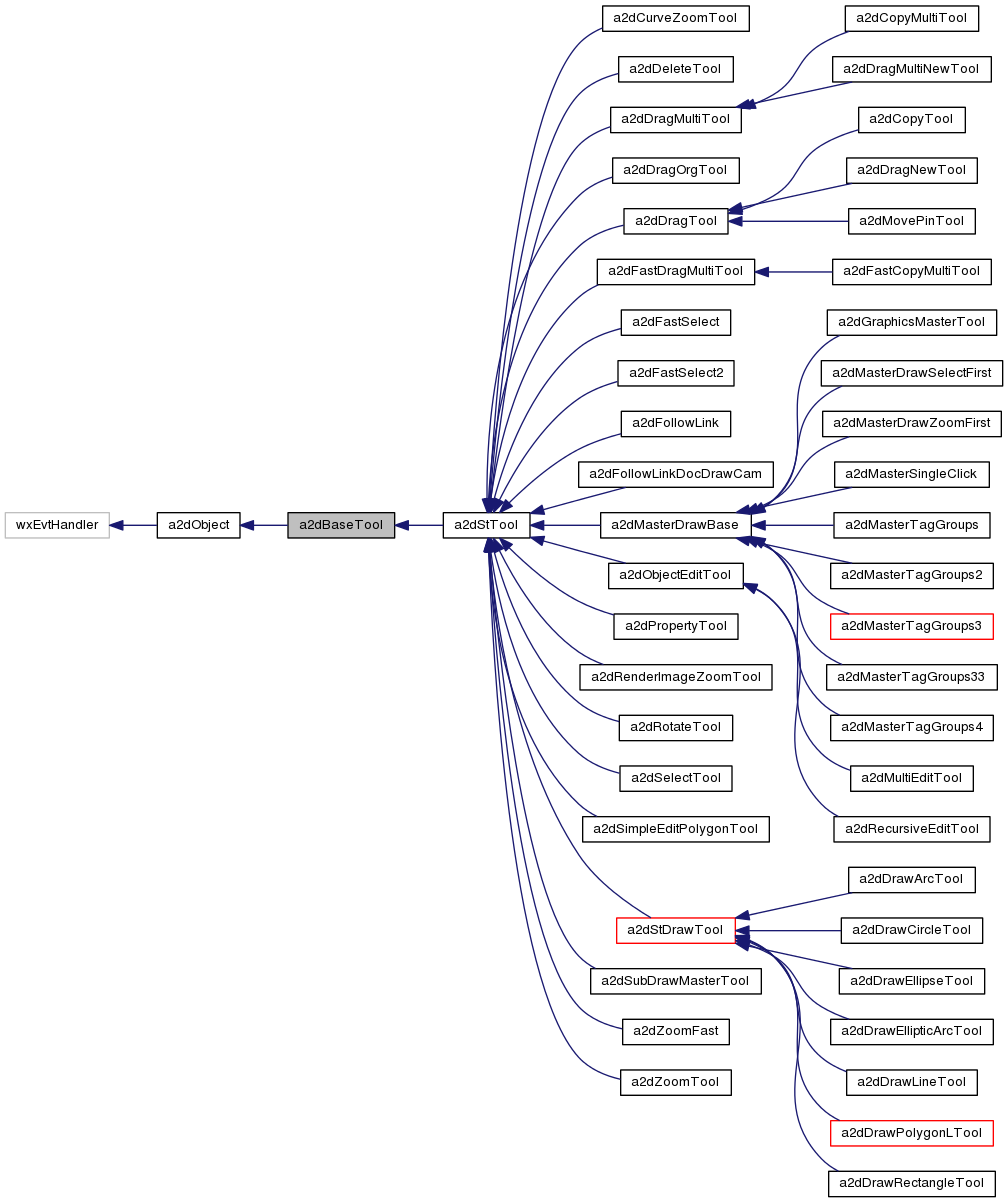
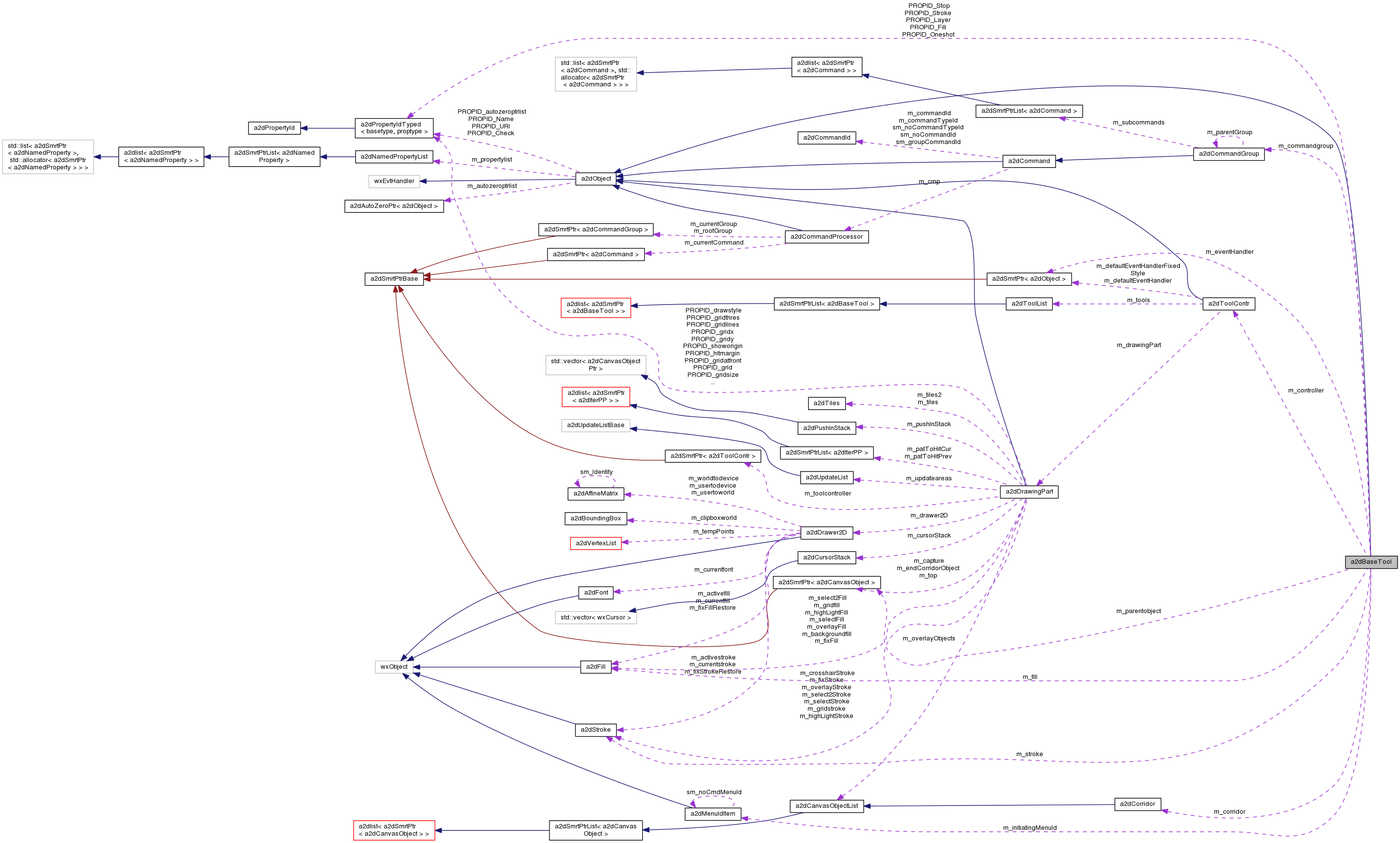
The a2dBaseTool is used to derive tools from that are controlled by. More...
#include <tools.h>
Public Member Functions | |
| bool | ProcessEvent (wxEvent &event) |
| events recieved from controller processed here More... | |
| void | SetEvtHandler (a2dObject *handler) |
| to reroute events to this event handler | |
| a2dObject * | GetEventHandler () |
| a2dBaseTool (a2dToolContr *controller, const a2dMenuIdItem &initiatingMenuId=CmdMenu_NoMenu()) | |
| construct a new tool for the given controller. | |
| a2dBaseTool (const a2dBaseTool &other, CloneOptions options, a2dRefMap *refs) | |
| constructor initializing partly from other tool | |
| virtual | ~a2dBaseTool () |
| destructor | |
| a2dBaseTool * | TClone (CloneOptions options, a2dRefMap *refs=NULL) |
| virtual wxString | GetToolString () const |
| virtual bool | StartTool (a2dBaseTool *currenttool) |
| called to initiate while pushing tool to toolcontroller More... | |
| void | SetOneShot () |
| Only one action of the tool, after that it will ask the controller to stop this tool. | |
| virtual bool | ZoomSave ()=0 |
| Is Zooming while the tool is busy Save. More... | |
| virtual bool | AllowPop () |
| tells if a tool can be poped from the stack. More... | |
| void | StopTool (bool abort=false) |
| call to stop a tool, internal and external. More... | |
| bool | GetStopTool () |
| checked by controller to see if the tool needs to be stopped e.g. after a oneshot. More... | |
| bool | GetActive () |
| is the tool active? More... | |
| virtual void | SetActive (bool active=true) |
| set the tool active or inactive. More... | |
| bool | GetBusy () |
| Check if the tool is busy editing a distinct object */. More... | |
| virtual bool | EnterBusyMode () |
| Called when the user selects a distinct object for editing */. More... | |
| virtual bool | EnterBusyModeNoGroup () |
| virtual void | FinishBusyMode (bool closeCommandGroup=true) |
| Called when the user finishes editing a distinct object */. More... | |
| virtual void | AbortBusyMode () |
| Called when the user aborts editing a distinct object */. More... | |
| void | SetFill (const a2dFill &fill) |
| set fill if used inside a tool | |
| const a2dFill & | GetFill () const |
| get the current fill More... | |
| void | SetStroke (const a2dStroke &stroke) |
| set stroke if used inside a tool | |
| const a2dStroke & | GetStroke () const |
| get the current stroke More... | |
| void | SetLayer (wxUint16 layer) |
| layer set for the object that is drawn using a tool | |
| wxUint16 | GetLayer () |
| layer set for new objects. | |
| void | SetShowAnotation (bool show) |
| when true anotation will be shown, if used inside a tool More... | |
| void | SetAnotationFont (const wxFont &font) |
| font to use for anotation | |
| void | SetCursorType (const wxCursor &cursor) |
| Sets cursor which the tool should use when started. More... | |
| void | SetBusyCursorType (const wxCursor &cursor) |
| Sets cursor which the tool should use when busy. More... | |
| wxCursor | GetCursorType () |
| what cursor is used when tool is started | |
| wxCursor | GetBusyCursorType () |
| what cursor is used when tool is busy | |
| virtual void | SetMode (int mode) |
| general integer to set operation modes for a tool (e.g the way it draws) More... | |
| int | GetMode () |
| can be used to modify the behaviour of the derived tool. More... | |
| void | SetPending (bool pending=true) |
| a tool is set pending when it needs to be redrawn. | |
| bool | GetPending () |
| return if the tool is set pending for redraw. | |
| virtual void | Render () |
| render the tool chain More... | |
| a2dToolContr * | GetToolController () |
| to get the tool controller to which this tool is attached. | |
| a2dDrawingPart * | GetDrawingPart () |
| Access to the tool controllers drawer. | |
| a2dDrawer2D * | GetDrawer2D () |
| Access to the tool controllers drawers drawer2d. | |
| wxWindow * | GetDisplayWindow () |
| Access to the tool controllers drawers canvas. | |
| a2dDrawing * | GetDrawing () |
| Returns a pointer to the drawing. | |
| a2dCanvasCommandProcessor * | GetCanvasCommandProcessor () |
| Returns a pointer to the command processor associated with this document. | |
| double | GetHitMargin () |
| virtual void | OpenCommandGroup (bool restart) |
| called when starting an editing operation (e.g. on mouse down) More... | |
| virtual void | OpenCommandGroupNamed (const wxString &name) |
| called when starting an editing operation with another than the default name | |
| virtual void | CloseCommandGroup () |
| called when ending an editing operation (e.g. mouse up) | |
| virtual wxString | GetCommandGroupName () |
| return the command group name for commands of a derived class More... | |
| a2dCommandGroup * | GetCommandgroup () |
| return the command group that is open else NULL. | |
| wxMenu * | GetMousePopupMenu () |
| to get the current mouse menu of the tool More... | |
| void | SetMousePopupMenu (wxMenu *mousemenu) |
| to set the current mouse menu of the tool More... | |
| a2dCanvasObject * | GetParentObject () |
| parent object relative to which the actions take place. More... | |
| void | AddEditobject (a2dCanvasObject *object) |
| Add an editcopy object to the tool/document. | |
| void | RemoveEditobject (a2dCanvasObject *object) |
| Remove an editcopy object to the tool/document. | |
| void | AddDecorationObject (a2dCanvasObject *object) |
| Add a decoration object to be rendered by the tool. More... | |
| void | RemoveAllDecorations () |
| remove all object that were added as decorations. | |
| void | SetIgnorePendingObjects (bool onoff) |
| Switches ignorance of pending objects on and off. More... | |
| bool | GetIgnorePendingObjects () |
| get setting of ignore pending objects /sa GetUpdatesPending() | |
| a2dCorridor & | GetCorridor () |
| get reference to the corridor list | |
| void | SetCorridor (const a2dCorridor &corridor) |
| set a corridor from a list of objects | |
| void | SetContourWidth (double width) |
| double | GetContourWidth () const |
| get the Contour width of the shape | |
| void | ResetContext () |
| context like corridor and parentobject are reset | |
| virtual bool | RotateObject90LeftRight (bool right) |
| rotate object of first tool on the stack, when appropriate. | |
| void | SetIsEditTool (bool isEditTool) |
| bool | GetIsEditTool () |
| void | SetInitiatingMenuId (const a2dMenuIdItem &initiatingMenuId) |
| const a2dMenuIdItem & | GetInitiatingMenuId () |
 Public Member Functions inherited from a2dObject Public Member Functions inherited from a2dObject | |
| bool | SearchDynamicEventTable (wxEvent &event) |
| void | Connect (int winid, int lastId, int eventType, wxObjectEventFunction func, wxObject *userData=(wxObject *) NULL, wxEvtHandler *eventSink=(wxEvtHandler *) NULL) |
| bool | Disconnect (int winid, int lastId, wxEventType eventType, wxObjectEventFunction func=NULL, wxObject *userData=(wxObject *) NULL, wxEvtHandler *eventSink=(wxEvtHandler *) NULL) |
| void | ProcessConnectedEvent (wxEvent &event) |
| wxCHECK_VERSION(2,9,0) More... | |
| void | ConnectEvent (wxEventType type, wxEvtHandler *eventSink) |
| bool | DisconnectEvent (wxEventType type, wxEvtHandler *eventSink) |
| bool | DisconnectEventAll (wxEvtHandler *eventSink) |
| Remove all dynamic events in classA, going to classB (eventSink) More... | |
| a2dObject () | |
| constructor | |
| virtual | ~a2dObject () |
| destructor | |
| void | operator= (const a2dObject &other) |
| assignment operator | |
| int | GetOwnedBy () |
| like it to be protected, but this does not work with wxList macros More... | |
| virtual a2dObject * | SetNonDynamic () |
| Call to mark this object as non-dynamic (static/local/auto) More... | |
| void | CheckReferences () |
| Check zero reference count and delete if count is 0. More... | |
| a2dObject * | Clone (CloneOptions options, a2dRefMap *refs=NULL) const |
| create an exact copy of this property | |
| a2dObject (const a2dObject &other, CloneOptions options, a2dRefMap *refs) | |
| virtual wxString | GetName () const |
| Returns the name of this object, if no name is given the internal id will be returned. More... | |
| virtual void | SetName (const wxString &name) |
| Creates the a2dStringProperty PROPID_Name. More... | |
| virtual bool | IsTemporary_DontSave () const |
| Check if this is a temporary object, which should not be saved. | |
| void | SaveAsDocument (a2dIOHandlerXmlSerOut &out) |
| Save this object and all below as an XML document. More... | |
| virtual void | Save (wxObject *parent, a2dIOHandlerXmlSerOut &out, a2dObjectList *towrite) |
| write all needed to an XML type of file called the CVG format More... | |
| void | LoadFromDocument (a2dIOHandlerXmlSerIn &parser) |
| Load this object and all below from an XML document. More... | |
| virtual void | Load (wxObject *parent, a2dIOHandlerXmlSerIn &parser) |
| load object from CVG file More... | |
| wxInt64 | GetUniqueSerializationId () const |
| return a unique id for this object More... | |
| virtual bool | AlwaysWriteSerializationId () const |
| If true, always write an id. More... | |
| virtual bool | LinkReference (a2dObject *other) |
| link a reference in the object to the given value More... | |
| virtual void | ResolveInform () |
| inform an object that reference resolution was done More... | |
| void | Walker (wxObject *parent, a2dWalkerIOHandler &handler) |
| This is used to recursively walk through an object tree. | |
| void | SetCheck (bool check) |
| general flag use at will. More... | |
| bool | GetCheck () const |
| general flag use at will. | |
| void | SetRelease (bool value) |
| set release flag More... | |
| bool | GetRelease () const |
| get release flag More... | |
| a2dAutoZeroPtr< a2dObject > ** | GetAutoZeroPtrList () |
| return the list head pointer for autozero pointers to this object More... | |
| DECLARE_PROPERTIES () | |
| a2dNamedProperty * | GetProperty (const a2dPropertyId *propertyId, a2dPropertyId::Flags flags=a2dPropertyId::flag_none) const |
| get property on this object More... | |
| void | SetProperty (a2dNamedProperty *propertyHolder, a2dPropertyId::SetFlags flags=a2dPropertyId::set_none) |
| Set the property to the this object. More... | |
| void | SetProperty (const a2dNamedProperty &propertyHolder, a2dPropertyId::SetFlags flags=a2dPropertyId::set_none) |
| Set the property to the this object and if enabled, to all childs and object members. More... | |
| virtual a2dNamedProperty * | FindProperty (const a2dPropertyId *id, a2dPropertyId::Flags flags=a2dPropertyId::flag_none) |
| Find a dynamic property with given id in the property list. More... | |
| virtual const a2dNamedProperty * | FindProperty (const a2dPropertyId *id, a2dPropertyId::Flags flags=a2dPropertyId::flag_none) const |
| Find a dynamic property with given id in the property list. More... | |
| virtual bool | HasProperty (const a2dPropertyId *id, const wxString &stringvalue=wxEmptyString) const |
| Check if the object has a property with given id and string representation. More... | |
| virtual void | OnPropertyChanged (const a2dPropertyId *id) |
| This function is called after a property changed. More... | |
| virtual bool | EditProperties (const a2dPropertyId *id, bool withUndo=true) |
| edit properties of the object More... | |
| void | TakeOverProperties (a2dObject *from, a2dPropertyIdList *listOfIds) |
| Properties in the id list are taken from the given object, en set to this. More... | |
| wxURI | GetURI () const |
| quick way to get to PROPID_URI property More... | |
| void | SetURI (const wxURI &url) |
| quickly set a property PROPID_URI More... | |
| const a2dNamedPropertyList & | GetPropertyList () const |
| Get the Property List. More... | |
| bool | HasDynamicProperties () const |
| test if there are dynamic properties in the m_propertylist | |
| virtual bool | RemoveProperty (const a2dPropertyId *id, bool all=true) |
| This function is called by a2dPropertyId to remove a property from the list. More... | |
| void | RemoveTemporaryProperties () |
| remove all temporary properties | |
| virtual bool | AddProperty (a2dNamedProperty *property) |
| This function is called by a2dPropertyId to add a property to the list. More... | |
Public Attributes | |
| bool | m_halted |
| if a tool is deactivated while m_busy is true, this flag is set | |
| bool | m_pending |
| set when tool needs an redraw (after a a2dCanvas Repaint etc.) More... | |
| bool | m_oneshot |
| do it only once | |
| bool | m_stop |
| stop the tool | |
| a2dFill | m_fill |
| fill for new object | |
| a2dStroke | m_stroke |
| stroke for new object | |
| double | m_contourwidth |
| if != 0 the polygon is contoured at distance m_contourwidth/2 | |
| wxUint16 | m_layer |
| layer for a new object | |
| bool | m_canvas_mouseevents_restore |
| used to save the a2dCanvas mouse event setting. More... | |
| bool | m_anotate |
| when true anotation will be shown, if used inside a tool | |
| wxFont | m_annotateFont |
| font to use for anotation | |
| int | m_mode |
| general operation mode setting for a tool. | |
| a2dCommandGroup * | m_commandgroup |
| the command group of the command processor | |
| wxMenu * | m_mousemenu |
| popup menu | |
| a2dCanvasObjectPtr | m_parentobject |
| ( if needed ) parent a2dCanvasObject relative to which the tool actions take place. | |
Static Public Attributes | |
| static const a2dSignal | sig_toolPushed = wxNewId() |
| sent to new first tool when tool was pushed | |
| static const a2dSignal | sig_toolPoped = wxNewId() |
| sent to new first tool when last first tool was poped | |
| static const a2dSignal | sig_toolBeforePush = wxNewId() |
| static const a2dSignal | sig_toolDoPopBeforePush = wxNewId() |
| return id after a sig_toolBeforePush, to tell current tool needs to be poped. | |
| static const a2dSignal | sig_toolComEvent = wxNewId() |
| not yet used. | |
| static a2dPropertyIdBool * | PROPID_Oneshot = NULL |
| static a2dPropertyIdBool * | PROPID_Stop = NULL |
| static a2dPropertyIdFill * | PROPID_Fill = NULL |
| static a2dPropertyIdStroke * | PROPID_Stroke = NULL |
| static a2dPropertyIdUint16 * | PROPID_Layer = NULL |
| Static Public Attributes inherited from a2dObject | |
| static a2dPropertyIdBool * | PROPID_Check = NULL |
| used for linking multiple referenced objects when serializing | |
| static a2dPropertyIdUri * | PROPID_URI = NULL |
| attach an URL to the object | |
| static a2dPropertyIdString * | PROPID_Name = NULL |
| Name property, to return name of this object. | |
| static a2dPropertyIdVoidPtr * | PROPID_autozeroptrlist = NULL |
| static const a2dSignal | sm_Edit_properties = wxNewId() |
| edit properties event, see EditProperties() | |
Protected Member Functions | |
| void | OnComEvent (a2dComEvent &event) |
| default handler for a2dComEvent event More... | |
| void | OnDoEvent (a2dCommandProcessorEvent &event) |
| void | OnUndoEvent (a2dCommandProcessorEvent &event) |
| void | OnRedoEvent (a2dCommandProcessorEvent &event) |
| void | OnMouseEvent (wxMouseEvent &event) |
| called on mouse events | |
| void | OnChar (wxKeyEvent &event) |
| called on key events | |
| void | OnKeyDown (wxKeyEvent &event) |
| called on keydown events | |
| void | OnKeyUp (wxKeyEvent &event) |
| called on keyup events | |
| virtual void | DoStopTool (bool abort) |
| to do tool specific stuff to stop a tool. Called from StopTool(). | |
| Protected Member Functions inherited from a2dObject | |
| virtual bool | DoIgnoreIfNotMember (const a2dPropertyId *id) const |
| used to decide if a property shall be ignored, if it is not a member More... | |
| virtual void | DoWalker (wxObject *parent, a2dWalkerIOHandler &handler) |
| iterate over this object and its children More... | |
| virtual void | DoSave (wxObject *parent, a2dIOHandlerXmlSerOut &out, a2dXmlSer_flag xmlparts, a2dObjectList *towrite) |
| Save settings. | |
| virtual void | DoLoad (wxObject *parent, a2dIOHandlerXmlSerIn &parser, a2dXmlSer_flag xmlparts) |
| Load settings. | |
Protected Attributes | |
| const a2dMenuIdItem * | m_initiatingMenuId |
| command which initiated the tool, used to seperate commands using the tool | |
| wxCursor | m_toolcursor |
| cursor to use | |
| wxCursor | m_toolBusyCursor |
| cursor to use when the tool is busy doing something. | |
| a2dToolContr * | m_controller |
| under control of this toolcontroller, to give me events. | |
| bool | m_active |
| tool is operational | |
| wxUint8 | m_bussyStopping |
| if > 0, the tool is in the process of stopping, which means it can not be poped yet by controller. | |
| a2dSmrtPtr< a2dObject > | m_eventHandler |
| when set called before own event handler More... | |
| bool | m_ignorePendingObjects |
| if set ignore all setting for pendingobjects | |
| a2dCorridor | m_corridor |
| bool | m_isEditTool |
| if tool does change drawing | |
| Protected Attributes inherited from a2dObject | |
| a2dNamedPropertyList | m_propertylist |
| properties | |
| int | m_refcount |
| how many references to this object do exist | |
| bool | m_check: 1 |
| used for linking multiple referenced objects when serializing | |
| bool | m_release: 1 |
| when set object is treated as being deleted, and wil be deleted in idle time. | |
| bool | m_recursion_active: 1 |
| this is used as a recursion stopper | |
| bool | m_pendingDisconnects: 1 |
| unsigned int | m_iteratorCount |
| a2dAutoZeroPtr< a2dObject > * | m_autozeroptrlist |
| this is a list of all a2dAutoZeroPtr object pointing to this object | |
Additional Inherited Members | |
| Public Types inherited from a2dObject | |
| enum | CloneOptions { clone_members = 0x00000001, clone_properties = 0x00000002, clone_childs = 0x00000004, clone_unused = 0x00000008, clone_setoriginal = 0x00000010, clone_seteditcopy = 0x00000020, clone_noReference = 0x00000040, clone_noCameleonRef = 0x00000080, clone_toDrag = 0x00000100, clone_flat = 0x00000000, clone_deep = clone_members | clone_properties | clone_childs } |
| options for cloning More... | |
| typedef a2dAutoZeroPtr< a2dObject > | TAutoZeroPtrListClass |
| this is needed inside the smart pointer template code | |
| Protected Types inherited from a2dObject | |
| enum | { refcount_nondynamic = 0x76543210 } |
| special refcount value for non-dynamic objects | |
Detailed Description
The a2dBaseTool is used to derive tools from that are controlled by.
a a2dToolContr derived class.
The basetool does not implement default behaviour for events in many cases, instead it is possible to set m_eventHandler to take care of action which are the same for a set of tools. a2dBaseTool::ProcessEvent() first redirect incoming events to m_eventHandler, and if not handled there it goes to the tools its own event handler.
- wxEventType sig_toolPushed sent from controller just after this tool is pushed, the tool is the first on the stack. This event can be used to have a master tool push extra tools.
- a2dComEvent( GetFirstTool(), poped, &sig_toolPoped ) sent from controller to tool when some other tool is poped from the tool stack. This can be used to control style settings for this tool, based on the last active tool on the top of the tool stack. E.g When style is changed when editing a primitive, the tool that was used to draw this primitive and started the editing tool, normally wants to take over this style. This function is called just after a tool was poped from the stack.
- a2dComEvent( GetFirstTool(), poped, &sig_toolBeforePoped ) sent from controller when a new tool is pushed, while the current tool is on the stack. This can be used to control halting or stopping of the current tool. E.g. When a tool allows Zooming while busy, you halt the tool here, but while the new tool is totataly independent, one may terminate the current tool action and close its command group. This function is called just before the new tool is indeed pushed on the stack.
- See Also
- a2dToolContr
Member Function Documentation
|
virtual |
Called when the user aborts editing a distinct object */.
- See Also
- EnterBusyMode This is supposed to undo aeverything the tool did since entering busy mode
Reimplemented in a2dMovePinTool, a2dDragMultiNewTool, a2dDragMultiTool, a2dDrawWirePolylineLTool, a2dRotateTool, a2dDragOrgTool, a2dDragTool, a2dMasterTagGroups33, a2dMasterDrawZoomFirst, a2dStDrawTool, a2dMasterTagGroups4, a2dMasterSingleClick, a2dMasterTagGroups3, a2dFastDragMultiTool, a2dObjectEditTool, a2dMasterTagGroups2, a2dStTool, a2dMasterTagGroups, and a2dSimpleEditPolygonTool.
| void a2dBaseTool::AddDecorationObject | ( | a2dCanvasObject * | object | ) |
|
inlinevirtual |
|
virtual |
Called when the user selects a distinct object for editing */.
- See Also
- GetActive for a discription of various tool states You should call the base class (this) version at the END of your function
Reimplemented in a2dMovePinTool, a2dDragMultiNewTool, a2dDragMultiTool, a2dDrawWirePolylineLTool, a2dRotateTool, a2dCopyTool, a2dDragNewTool, a2dDragOrgTool, a2dDragTool, a2dSelectTool, a2dStDrawTool, a2dFastDragMultiTool, a2dObjectEditTool, a2dStTool, and a2dSimpleEditPolygonTool.
|
virtual |
Called when the user finishes editing a distinct object */.
- See Also
- EnterBusyMode,
- GetActive You should call the base class (this) version at the END of your function
Reimplemented in a2dMovePinTool, a2dDragMultiNewTool, a2dDragMultiTool, a2dDrawWirePolylineLTool, a2dRotateTool, a2dCopyTool, a2dDragNewTool, a2dDragOrgTool, a2dDragTool, a2dStDrawTool, a2dObjectEditTool, and a2dStTool.
|
inline |
is the tool active?
A tool is "active", when it receives mouse input. Usually this is only the top tool on the tool stack. This is something completely different then "busy". A tool is "busy", when it currently focuses on editing a specific object. Toolstates change like this:
- Created
- Pushed on the tool stack -> set active
- User clicks on an object to edit -> set busy
- User starts a different tool (e.g. zoom) -> busy but not active (halted)
- subtool is stopped -> set active again (and busy)
- User continues editing the object selected in 3. -> still busy
- User finishes editing the object selected in 3. -> no longer busy, but still active "One-shot" tools are stopped in this situations, other tools continue.
- User clicks on a different object, repeat step 3..7 -> busy again
- User stops tool (end tool menu or ESC or 2x double-click ...) -> stopped 10 Tool gets popped from the tool stack
|
inline |
|
virtual |
return the command group name for commands of a derived class
this defaults to the class name
Reimplemented in a2dMovePinTool, a2dDrawVPathTool, a2dCopyMultiTool, a2dDragMultiNewTool, a2dDragMultiTool, a2dDrawWirePolylineLTool, a2dDrawPolygonLTool, a2dDrawArcTool, a2dDeleteTool, a2dRotateTool, a2dCopyTool, a2dDragNewTool, a2dDragOrgTool, a2dDragTool, a2dSelectTool, a2dZoomTool, a2dDrawRectangleTool, a2dDrawPolygonLToolFast, a2dDrawRectangleToolFast, a2dFastCopyMultiTool, a2dRecursiveEditTool, a2dFastDragMultiTool, a2dObjectEditTool, a2dFastSelect2, a2dMeasureTool, a2dFastSelect, a2dZoomFast, a2dSimpleEditPolygonTool, and a2dCurveZoomTool.
|
inline |
| double a2dBaseTool::GetHitMargin | ( | ) |
Get the hitmargin in world coordinates, base on the pin a2dCanvasGlobals->GetPinSize()/2.0 If a2dPin its pinsize is pixelbased, it is translated to world calculated based on the active a2dDrawingPart.
|
inline |
|
inline |
|
inline |
parent object relative to which the actions take place.
Tools can do there work on child objects of some parent a2dCanvasObject. In such cases the context of the tool is set with SetCorridor(), and the last object in the corridor is the m_parentobject.
| bool a2dBaseTool::GetStopTool | ( | ) |
checked by controller to see if the tool needs to be stopped e.g. after a oneshot.
or when wanted. The stop flag is in general set after a tool has received and handled an event which should stop the tool. A tool should not stop itself, since the tool will be deleted. The StopTool() function is called in such a case to trigger the stopping of the tool.
|
inline |
|
protected |
default handler for a2dComEvent event
Event id a2dDrawingPart::sig_changedShowObject makes the tools corridor change to keep the tool active. In derived tools one can implement different behaviour if needed.
|
virtual |
|
virtual |
|
inlinevirtual |
render the tool chain
A tool chain gets rendered when a2dDrawingPart is updating areas that are changed in a document.
Reimplemented in a2dDragMultiTool, a2dDragOrgTool, a2dDragTool, a2dMasterTagGroups33, a2dMasterTagGroups4, a2dMasterDrawZoomFirst, a2dMasterSingleClick, a2dMasterTagGroups3, a2dFastDragMultiTool, a2dStTool, a2dMasterTagGroups2, a2dObjectEditTool, a2dFastSelect, a2dMasterTagGroups, a2dZoomFast, and a2dStDrawToolFast.
|
virtual |
set the tool active or inactive.
If the tool needs initializing after it was inactive for a while, override this function to re-initialize the tool. This function can be used to distribute its settings for style etc. to the documents
- See Also
- a2dCanvasDocument::GetCanvasCommandProcessor(). The default implementation sets fill, stroke to the commandprocessor, but only when m_doSetStyleToCommandProc is true. If you need more complicated behaviour just override.
Reimplemented in a2dDrawWirePolylineLTool, a2dMasterTagGroups33, a2dMasterTagGroups4, a2dMultiEditTool, a2dMasterSingleClick, a2dMasterTagGroups3, a2dStTool, and a2dObjectEditTool.
|
inline |
|
inline |
Sets cursor which the tool should use when started.
You may change the predefined cursor which the tool uses when it becomes active.
- Remarks
- Many tools are using more than one cursor. These cursors indicate the status of the tool (busy etc.) and only the busy cursor can be changed currently. This cursor only indicate that the tool is active.
- Parameters
-
cursor the tool cursor
| void a2dBaseTool::SetIgnorePendingObjects | ( | bool | onoff | ) |
Switches ignorance of pending objects on and off.
If set to true pending objects won't be updated. This method is used by several tools (i.e. a2dDragTool) to avoid updates while the tool is working.
- See Also
- GetUpdatesPending()
- Parameters
-
onoff trueto ignore pending objects, elsefalse
|
inlinevirtual |
general integer to set operation modes for a tool (e.g the way it draws)
tools most check the mode and handle in accordance In general Tab should be used to tab/switch/circle between modes understood by a tool.
Reimplemented in a2dDrawVPathTool, a2dDrawPolygonLTool, a2dDrawArcTool, a2dDrawEllipticArcTool, a2dDrawEllipseTool, a2dDrawCircleTool, a2dDrawPolygonLToolFast, a2dDrawCircleToolFast, a2dFastDragMultiTool, and a2dObjectEditTool.
| void a2dBaseTool::SetMousePopupMenu | ( | wxMenu * | mousemenu | ) |
|
inline |
|
virtual |
| void a2dBaseTool::StopTool | ( | bool | abort = false | ) |
call to stop a tool, internal and external.
The stop flag within the tool will be set, triggering deletion of the tool from the outside by the a2dToolContr. Stopping one tool often means activating another which is on the tool stack of the a2dToolContr. Therefore the tools are really stopped and removed from the tool stack from the outside.
After this call the tool must be left in a state that allows the controller to pop the tool.
Override DoStopTool() function, if there is cleaning up to do before stopping a tool. Understand that stopping the tool is something else then (de)activating a tool. A tool can be de-activated, but still in action or at least on the toolstack. Stopping a tools really removes the tool from the stack by the controller.
To prevent poping the tool from the outside before it is really stopped, m_bussyStopping is incremented, when recursive calling this function. GetStopTool() only returns true when all recursive StopTool() calls have returned.
- Remarks
- If a tool can not be stopped right now, the function should return false.
- Stopping a tools will indirectly lead to the a2dToolContr Popping the tool from the stack, and that action at least de-activates the tool just stopped. So indirectly SetActive( false ) is called on this tool, when it is really stopped.
- Parameters
-
abort if true the tool is calling AbortBusyMode() instead FinishBusyMode(), the effect is that the tool does directly Undo what it was doing, but not yet did finish.
|
pure virtual |
Is Zooming while the tool is busy Save.
If so, the active tool will redraw itself in the new Mapping state
Implemented in a2dMovePinTool, a2dFollowLink, a2dDrawVPathTool, a2dPropertyTool, a2dDrawTextTool, a2dDragMultiNewTool, a2dDragMultiTool, a2dDrawPolygonLTool, a2dDrawArcTool, a2dDrawEllipticArcTool, a2dDrawEllipseTool, a2dDrawLineTool, a2dDrawCircleTool, a2dDeleteTool, a2dRotateTool, a2dCopyTool, a2dDragNewTool, a2dDragOrgTool, a2dDragTool, a2dImageTool, a2dSelectTool, a2dZoomTool, a2dDrawRectangleTool, a2dDrawPolygonLToolFast, a2dDrawCircleToolFast, a2dDrawRectangleToolFast, a2dMultiEditTool, a2dMasterDrawBase, a2dFastDragMultiTool, a2dFastSelect2, a2dMeasureTool, a2dSubDrawMasterTool, a2dFastSelect, a2dObjectEditTool, a2dFollowLinkDocDrawCam, a2dZoomFast, a2dSimpleEditPolygonTool, a2dLinkTool, a2dRenderImageZoomTool, and a2dCurveZoomTool.
Member Data Documentation
| bool a2dBaseTool::m_canvas_mouseevents_restore |
|
protected |
used in tools that can do nested editing/drawing. the corridor is a copy of the a2dCanvasObject in the a2dDocument that form the corridor path. re-activating a tool, this list can be used to re-instantiate the corridor path for the tool.
|
protected |
| bool a2dBaseTool::m_pending |
|
static |
The documentation for this class was generated from the following files: