when a new wire or other connection object needs to be created, More...
#include <connectgen.h>
Public Types | |
| enum | RouteMethod { StraightSegment, StraightEndSegment, GridRouting, StraightEndSegmentUnlessPins, StraightSegmentUnlessPins, ManhattanSegments, ManhattanEndSegments, ManhattanEndSegmentsStay, ManhattanEndSegmentsConvertAndStay } |
 Public Types inherited from a2dObject Public Types inherited from a2dObject | |
| enum | CloneOptions { clone_members = 0x00000001, clone_properties = 0x00000002, clone_childs = 0x00000004, clone_unused = 0x00000008, clone_setoriginal = 0x00000010, clone_seteditcopy = 0x00000020, clone_noReference = 0x00000040, clone_noCameleonRef = 0x00000080, clone_toDrag = 0x00000100, clone_flat = 0x00000000, clone_deep = clone_members | clone_properties | clone_childs } |
| options for cloning More... | |
| typedef a2dAutoZeroPtr< a2dObject > | TAutoZeroPtrListClass |
| this is needed inside the smart pointer template code | |
Public Member Functions | |
| a2dConnectionGenerator () | |
| constructor | |
| ~a2dConnectionGenerator () | |
| destructor | |
| virtual a2dCanvasObject * | CreateConnectObject (a2dCanvasObject *parent, a2dPin *pinThis, a2dPin *pinOther, bool undo=false) const |
| create connection object based on two pins which need to be connected. More... | |
| virtual a2dCanvasObject * | GetConnectTemplate (const a2dCanvasObject *object, a2dPinClass *thisPinClass, const a2dCanvasObject *other, a2dPinClass *otherPinClass) const |
| create connection object based on two pin classes, which (may) need to be connected. More... | |
| virtual void | SetPinsToBeginState (a2dCanvasObject *root, a2dCanvasObjectFlagsMask mask=a2dCanvasOFlags::VISIBLE) |
| set begin state of pins, before a tools starts asking feedback or after tool is finsihed | |
| virtual void | SetPinsToEndState (a2dCanvasObject *root, a2dCanvasObjectFlagsMask mask=a2dCanvasOFlags::VISIBLE) |
| set end state of pins after tool is finsihed | |
| virtual bool | GeneratePossibleConnections (a2dCanvasObject *object, a2dPinClass *pinClass, a2dConnectTask task, double x, double y, double margin) const |
| generate temporary pins to which objects can connect More... | |
| virtual a2dPinClass * | GetPinClassForTask (a2dPinClass *pinClass, a2dConnectTask task, a2dCanvasObject *obj=NULL, a2dPinClass *pinClassTo=NULL, a2dPin *pinFrom=NULL) const |
| return a a2dPinClass which should be used to connect to the input a2dPinClass. More... | |
| a2dPinClass * | GetAnyPinClass () const |
| return the pin class for GetPinClassForTask( a2dPinClass::Any ) More... | |
| void | SetAnyPinClass (a2dPinClass *pinClass) |
| see GetAnyPinClass() | |
| a2dPinClass * | GetReturnPinClass () const |
| a2dCanvasObject * | GetReturnConnect () const |
| bool | GetLastConnectCreationDirection () const |
| when a wire was created, this return the direction is was created ( first to last pin or visa versa ). | |
| virtual bool | GeneratePinsToConnect (a2dDrawingPart *part, a2dCanvasObject *root, a2dPinClass *pinClassToConnectTo, a2dConnectTask task, double xpin, double ypin, a2dCanvasObjectFlagsMask mask=a2dCanvasOFlags::VISIBLE) |
| virtual a2dPin * | SearchPinForFinishWire (a2dCanvasObject *root, a2dPin *pinToConnectTo, a2dPinClass *pinClassToConnectTo, double margin, a2dCanvasObjectFlagsMask mask=a2dCanvasOFlags::VISIBLE) |
| virtual a2dPin * | SearchPinForStartWire (a2dCanvasObject *root, double xpin, double ypin, a2dPinClass *pinClassToConnectTo, double margin, a2dCanvasObjectFlagsMask mask=a2dCanvasOFlags::VISIBLE) |
| virtual bool | GeneratePinsToConnectObject (a2dDrawingPart *part, a2dCanvasObject *root, a2dCanvasObject *connectObject, a2dPinClass *pinClassToConnectTo=NULL, a2dCanvasObjectFlagsMask mask=a2dCanvasOFlags::VISIBLE) |
| Generate pins on objects, and test which can connect to the given object. More... | |
| virtual bool | ConnectToPinsObject (a2dCanvasObject *root, a2dCanvasObject *connectObject, double margin, a2dPinClass *pinClassToConnectTo=NULL, a2dCanvasObjectFlagsMask mask=a2dCanvasOFlags::VISIBLE) |
| void | SetConnectObject (a2dCanvasObject *tmplObject) |
| the template object is used as a template for creating new wires between pins. More... | |
| a2dCanvasObject * | GetConnectObject () const |
| return connect object. | |
| void | AddRerouteWires (a2dCanvasObjectList *wires, a2dCanvasObject *parentOfWires) |
| void | AddRerouteWire (a2dCanvasObject *wire, a2dCanvasObject *parentOfWires) |
| void | PrepareForRewire (a2dCanvasObject *parent, a2dCanvasObjectList &dragList, bool walkWires=true, bool selected=false, bool stopAtSelectedWire=false, bool CreateExtraWires=true, a2dBaseTool *tool=NULL, a2dRefMap *refs=NULL) |
| void | CreateWiresOnPins (a2dCanvasObject *parent, const a2dCanvasObjectList &objectsToDrag, bool undo, bool onlyNonSelected=false) |
| create wires on pins which do not have wires, but directly are connected to other objects. More... | |
| void | OptimizeRerouteWires (bool removeZero=false) |
| void | ResetCloneBrother () |
| Reset clonebrothers. | |
| void | ResetPositionsToOrignals () |
| void | PrepareForRerouteWires (a2dBaseTool *tool=NULL, a2dRefMap *refs=NULL) |
| void | RerouteWires (bool final=false, bool fromOriginal=true) |
| void | SetRouteWhenDrag (bool routeWhenDrag) |
| route also while dragging object | |
| bool | GetRouteWhenDrag () |
| route also while dragging object | |
| void | SetRouteMethod (RouteMethod routing) |
| set the way routing will be done | |
| RouteMethod | GetRouteMethod () |
| wxString | GetRouteMethodAsString () |
| void | RotateRouteMethod () |
| cycle through routing methods | |
| void | SetAllowRedirect (bool allowredirect) |
| bool | GetAllowRedirect () |
| see SetAllowRedirect() | |
| void | SetGeneratePins (bool onOff) |
| bool | GetGeneratePins () const |
| void | SetNoEditCopy (bool noEditCopy) |
| bool | GetNoEditCopy () |
| void | SetOffSet (double offset) |
| double | GetOffSet () const |
| Public Member Functions inherited from a2dObject | |
| virtual bool | ProcessEvent (wxEvent &event) |
| bool | SearchDynamicEventTable (wxEvent &event) |
| void | Connect (int winid, int lastId, int eventType, wxObjectEventFunction func, wxObject *userData=(wxObject *) NULL, wxEvtHandler *eventSink=(wxEvtHandler *) NULL) |
| bool | Disconnect (int winid, int lastId, wxEventType eventType, wxObjectEventFunction func=NULL, wxObject *userData=(wxObject *) NULL, wxEvtHandler *eventSink=(wxEvtHandler *) NULL) |
| void | ProcessConnectedEvent (wxEvent &event) |
| wxCHECK_VERSION(2,9,0) More... | |
| void | ConnectEvent (wxEventType type, wxEvtHandler *eventSink) |
| bool | DisconnectEvent (wxEventType type, wxEvtHandler *eventSink) |
| bool | DisconnectEventAll (wxEvtHandler *eventSink) |
| Remove all dynamic events in classA, going to classB (eventSink) More... | |
| a2dObject () | |
| constructor | |
| virtual | ~a2dObject () |
| destructor | |
| void | operator= (const a2dObject &other) |
| assignment operator | |
| int | GetOwnedBy () |
| like it to be protected, but this does not work with wxList macros More... | |
| virtual a2dObject * | SetNonDynamic () |
| Call to mark this object as non-dynamic (static/local/auto) More... | |
| void | CheckReferences () |
| Check zero reference count and delete if count is 0. More... | |
| a2dObject * | Clone (CloneOptions options, a2dRefMap *refs=NULL) const |
| create an exact copy of this property | |
| a2dObject (const a2dObject &other, CloneOptions options, a2dRefMap *refs) | |
| virtual wxString | GetName () const |
| Returns the name of this object, if no name is given the internal id will be returned. More... | |
| virtual void | SetName (const wxString &name) |
| Creates the a2dStringProperty PROPID_Name. More... | |
| virtual bool | IsTemporary_DontSave () const |
| Check if this is a temporary object, which should not be saved. | |
| void | SaveAsDocument (a2dIOHandlerXmlSerOut &out) |
| Save this object and all below as an XML document. More... | |
| virtual void | Save (wxObject *parent, a2dIOHandlerXmlSerOut &out, a2dObjectList *towrite) |
| write all needed to an XML type of file called the CVG format More... | |
| void | LoadFromDocument (a2dIOHandlerXmlSerIn &parser) |
| Load this object and all below from an XML document. More... | |
| virtual void | Load (wxObject *parent, a2dIOHandlerXmlSerIn &parser) |
| load object from CVG file More... | |
| wxInt64 | GetUniqueSerializationId () const |
| return a unique id for this object More... | |
| virtual bool | AlwaysWriteSerializationId () const |
| If true, always write an id. More... | |
| virtual bool | LinkReference (a2dObject *other) |
| link a reference in the object to the given value More... | |
| virtual void | ResolveInform () |
| inform an object that reference resolution was done More... | |
| void | Walker (wxObject *parent, a2dWalkerIOHandler &handler) |
| This is used to recursively walk through an object tree. | |
| void | SetCheck (bool check) |
| general flag use at will. More... | |
| bool | GetCheck () const |
| general flag use at will. | |
| void | SetRelease (bool value) |
| set release flag More... | |
| bool | GetRelease () const |
| get release flag More... | |
| a2dAutoZeroPtr< a2dObject > ** | GetAutoZeroPtrList () |
| return the list head pointer for autozero pointers to this object More... | |
| DECLARE_PROPERTIES () | |
| a2dNamedProperty * | GetProperty (const a2dPropertyId *propertyId, a2dPropertyId::Flags flags=a2dPropertyId::flag_none) const |
| get property on this object More... | |
| void | SetProperty (a2dNamedProperty *propertyHolder, a2dPropertyId::SetFlags flags=a2dPropertyId::set_none) |
| Set the property to the this object. More... | |
| void | SetProperty (const a2dNamedProperty &propertyHolder, a2dPropertyId::SetFlags flags=a2dPropertyId::set_none) |
| Set the property to the this object and if enabled, to all childs and object members. More... | |
| virtual a2dNamedProperty * | FindProperty (const a2dPropertyId *id, a2dPropertyId::Flags flags=a2dPropertyId::flag_none) |
| Find a dynamic property with given id in the property list. More... | |
| virtual const a2dNamedProperty * | FindProperty (const a2dPropertyId *id, a2dPropertyId::Flags flags=a2dPropertyId::flag_none) const |
| Find a dynamic property with given id in the property list. More... | |
| virtual bool | HasProperty (const a2dPropertyId *id, const wxString &stringvalue=wxEmptyString) const |
| Check if the object has a property with given id and string representation. More... | |
| virtual void | OnPropertyChanged (const a2dPropertyId *id) |
| This function is called after a property changed. More... | |
| virtual bool | EditProperties (const a2dPropertyId *id, bool withUndo=true) |
| edit properties of the object More... | |
| void | TakeOverProperties (a2dObject *from, a2dPropertyIdList *listOfIds) |
| Properties in the id list are taken from the given object, en set to this. More... | |
| wxURI | GetURI () const |
| quick way to get to PROPID_URI property More... | |
| void | SetURI (const wxURI &url) |
| quickly set a property PROPID_URI More... | |
| const a2dNamedPropertyList & | GetPropertyList () const |
| Get the Property List. More... | |
| bool | HasDynamicProperties () const |
| test if there are dynamic properties in the m_propertylist | |
| virtual bool | RemoveProperty (const a2dPropertyId *id, bool all=true) |
| This function is called by a2dPropertyId to remove a property from the list. More... | |
| void | RemoveTemporaryProperties () |
| remove all temporary properties | |
| virtual bool | AddProperty (a2dNamedProperty *property) |
| This function is called by a2dPropertyId to add a property to the list. More... | |
Protected Member Functions | |
| void | EndManhattanRoute (a2dPin *pin, a2dLineSegment *seg1, a2dLineSegment *seg2, a2dLineSegment *seg3, a2dVertexList *points, bool reverse) |
| Protected Member Functions inherited from a2dObject | |
| virtual bool | DoIgnoreIfNotMember (const a2dPropertyId *id) const |
| used to decide if a property shall be ignored, if it is not a member More... | |
| virtual void | DoWalker (wxObject *parent, a2dWalkerIOHandler &handler) |
| iterate over this object and its children More... | |
Protected Attributes | |
| a2dCanvasObjectList * | m_wires |
| a2dCanvasObjectList * | m_wiresEditCopies |
| bool | m_routeWhenDrag |
| RouteMethod | m_routeMethod |
| a2dCanvasObjectPtr | m_tmplObject |
| Template for created object which represents a connection. e.g a2dWirePolylineL. | |
| a2dPinClass * | m_returnPinClass |
| a2dCanvasObject * | m_returnConnect |
| a2dPinClass * | m_anypinclass |
| template pinclass | |
| bool | m_reverseCreate |
| how to create a connection | |
| bool | m_allowredirect |
| bool | m_generatePins |
| double | m_offset |
| Protected Attributes inherited from a2dObject | |
| a2dNamedPropertyList | m_propertylist |
| properties | |
| int | m_refcount |
| how many references to this object do exist | |
| bool | m_check: 1 |
| used for linking multiple referenced objects when serializing | |
| bool | m_release: 1 |
| when set object is treated as being deleted, and wil be deleted in idle time. | |
| bool | m_recursion_active: 1 |
| this is used as a recursion stopper | |
| bool | m_pendingDisconnects: 1 |
| unsigned int | m_iteratorCount |
| a2dAutoZeroPtr< a2dObject > * | m_autozeroptrlist |
| this is a list of all a2dAutoZeroPtr object pointing to this object | |
Additional Inherited Members | |
| Static Public Attributes inherited from a2dObject | |
| static a2dPropertyIdBool * | PROPID_Check = NULL |
| used for linking multiple referenced objects when serializing | |
| static a2dPropertyIdUri * | PROPID_URI = NULL |
| attach an URL to the object | |
| static a2dPropertyIdString * | PROPID_Name = NULL |
| Name property, to return name of this object. | |
| static a2dPropertyIdVoidPtr * | PROPID_autozeroptrlist = NULL |
| static const a2dSignal | sm_Edit_properties = wxNewId() |
| edit properties event, see EditProperties() | |
| Protected Types inherited from a2dObject | |
| enum | { refcount_nondynamic = 0x76543210 } |
| special refcount value for non-dynamic objects | |
Detailed Description
when a new wire or other connection object needs to be created,
this class or a derived one, will deliver the right connection object. In other situations it will tell which objects are connectable on two pins, and the wire needed for that.
The idea is that objects do not only decide themselfs if they can connect to other objects and which. Instead this job is centralized to this class. Because of that, an object does not need to know himself to which objects it can connect, and what wire to use for that. The a2dConnectionGenerator knows which objects can connect to others. Actually in the default situation it is not the canvas object which decides, what can be connected to it. Instead the pinclass of a pin on the canvas object, is the input for the a2dConnectionGenerator. So one asks the a2dConnectionGenerator if a pinclass of a pin on a certain object, can connect to something else.
This class here can restrict what is the default way of allowing connections, or implement its own rules. When you want to limit the possible connection you can switch to a derived a2dConnectionGenerator. An a2dConnectionGenerator is shared by a set of a2dPinClass Objects, and this is how one finds the a2dConnectionGenerator for a connection task at hand.
As an example of a derived a2dConnectionGenerator: if you want to limit a wire tool to only draw lines from objects which have pins of a specific pin class, overriding GeneratePossibleConnections() can do the job.
a2dPinClass itself has information on which other a2dPinClass it may connect to, and two pin classes can only connect if they both agree. a2dPinClass even knows which type of wire/connect object is required to connect the pin to a pin on a wire. So when starting a new wire, at a certain pin, the object and wire its a2dPinClass must be able to connect to one another. A wiretool is only able to connect two pins of objects if the pinclasses in its connect lists are compatible, meaning the one pin contains the other as connectable. If the pin is oke, the found PinClassMap defines what type of wire needs to be created now. This information is stored in the a2dPinClass, as a template wire/connect object. The tool therefore is able to generate a2dCanvasObject connections ( e.g. a2dWirePolylineL wires ) of different types, and which type is created depends on the pin that is hit when starting a wire.
In the above one canvas object was normal and the connecting canvas object was a wire. Another situation is when two normal canvas objects are dragged appart and a wire needs to be created in between. Again pinclasses of the two a2dPin's that will be disconnected, will be searched in its connect lists, for a wire pincclass, which can connect to both pins. When a wire pinclass is found which can connect to both pins, the type of wire will be created via that same pinclass its template object for a wire. This is achieved CreateConnectObject().
To understand the principle, imagine 3 a2dCanvasObject's with pins which have Pin classes.
- one with a2dPinClass A
- the second with a2dPinClass B
- the third with a2dPinClass C Now when A connects to B we want a wire of type X, if A connects to C, we want wire Y, at last when C connects to B we want wire Z. On top of this the direction of the connection can be defined, A to C can be different from C to A. The information on which pin can connect to which other pin, is stored in the a2dPinClass of the a2dPin. Here one can find which other a2dPinClass object can connect to this one, and if it is for a wire, a template object to create that wire.
If more B objects are connected to an A object, via multiple wires, the connection of wires to wires must be defined too To conclude we are not only defining the relations between A-B-C, but also the wire begin and end relations towards eachother. In our case here, we create wires which are extensions of the pin where they are connected to, meaning the end pin of the wire is the same as the pinclass to which the begin pin is connected. All this to connect one object pin with pinclass to other objects at a pin with a certain pin class. If we define 3 pinclasses for pins on the object A,B,C and three extra pinclasses WA WB WC for wire between those objects, we get the following connection tables.
For the pinclasses which can be connected to each other:
- (A-PinClass) -> (B-PinClass) (C-PinClass) (WB-PinClass) (WC-PinClass)
- (B-PinClass) -> (A-PinClass) (C-PinClass) (WA-PinClass) (WC-PinClass)
- (C-PinClass) -> (A-PinClass) (B-PinClass) (WA-PinClass) (WB-PinClass)
We get for wires which start at A or C:
- (A-PinClass) -> (WB-PinClass) Wire X (WA-PinClass) -> (B-PinClass)
- (A-PinClass) -> (WC-PinClass) Wire Y (WA-PinClass) -> (C-PinClass)
- (C-PinClass) -> (WB-PinClass) Wire Z (WC-PinClass) -> (B-PinClass)
And if bidirectional wires which start at B or C:
- (B-PinClass) -> (WA-PinClass) Wire X (WB-PinClass) -> (A-PinClass)
- (C-PinClass) -> (WA-PinClass) Wire Y (WC-PinClass) -> (A-PinClass)
- (B-PinClass) -> (WC-PinClass) Wire Z (WB-PinClass) -> (C-PinClass)
Interesting in this table is that one can not start a wire on an object, whithout knowing its type, since always two are possible. So a wire tool needs to define for which pinclass a wire is needed, before asking this a2dConnectionGenerator to tell if the object is oke with that. Another option is to start a wire on a starting pin, and only when finishing the wire decide what type of wire is really needed for the begin and end pin of the wire. It is best to give wires other pinclasses then normal objects, since that makes it easier to know if one can start a wire on a certain pin, and what type of wire it needs to be.
As an example, drawing a wire using a tool. If the user clicks on an object type pin, the corresponding pin in the newly created wire will be a Non object type pin.
At last in the above, there were three objects, but in fact they are of no interest, since the pins its pinclasses define all. This way it is possible to define several "flows" in a group of objects. E.g. You can define in and output pinclasses for each flow you require. Multiple flow pins can be added to the same object, connecting a set of flow pins by one type of wire. You end up with several flows within a group of objects ( control flow - data flow ).
Where need a2dConnectionGenerator takes settings from the currently active a2dHabitat: a2dCanvasGlobals->GetHabitat() So if not set already by the currently active view/drawingpart, set it first ( a2dDrawingPart::SetShowObject() ).
Definition at line 153 of file connectgen.h.
Member Enumeration Documentation
Definition at line 159 of file connectgen.h.
Member Function Documentation
|
virtual |
create connection object based on two pins which need to be connected.
Called from the default a2dCanvasObject::CreateConnectObject(), in order to easily change the behaviour of standard objects concerning possible connections. The returned object is a (connection) object (e.g. a2dWirePolylineL ), with correct pins at the position of pinThis and pinOther. The pins are connected already. When undo is true, the right commands are sent to the document its command processor. In general this means those commands are part of a group of commands in a a2dCommandGroup, which internal resulted in a connection being created. For example as a result of dragging an object.
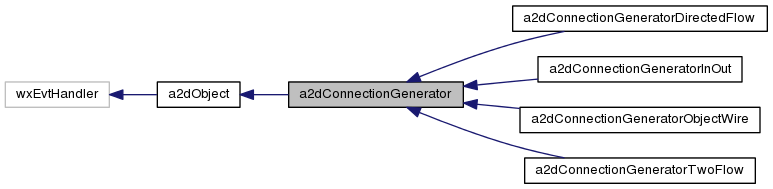
Reimplemented in a2dConnectionGeneratorTwoFlow.
Definition at line 1766 of file connectgen.cpp.
| void a2dConnectionGenerator::CreateWiresOnPins | ( | a2dCanvasObject * | parent, |
| const a2dCanvasObjectList & | objectsToDrag, | ||
| bool | undo, | ||
| bool | onlyNonSelected = false |
||
| ) |
create wires on pins which do not have wires, but directly are connected to other objects.
This prepares the object for dragging/moving, while preserving the connection, since then wires will be rerouted when dragging.
Definition at line 163 of file connectgen.cpp.
|
virtual |
generate temporary pins to which objects can connect
When drawing wires object, other object are asked to display pin position, to which the wire may connect. See a2dCanvasObject::GeneratePinsPossibleConnections(). This process is called by the tools, and is called editing Feedback. The pins created are only temporary, and will be removed at the end of a tool its busy cycle or when needed.
The default implementation uses pinClass->GetConnectionGenerator() to ask this object to generate a pin in a2dCanvasObject::GeneratePins(). The reason for this, is that there may be more involved to allow a pin to connect. Like the pin class.
- Parameters
-
object The object on which to create temporary pins pinClass The pinclass to which the generated pins must be able to connect, if NULL any pinclass task for what purpose is the connection needed x only connect at this position y only connect at this position
Definition at line 1989 of file connectgen.cpp.
|
inline |
return the pin class for GetPinClassForTask( a2dPinClass::Any )
Basic object can generate pins by a2dPinclass, but i8n case of a2dPinClass::Any it will generate pins of this pinclass.
Definition at line 239 of file connectgen.h.
|
virtual |
create connection object based on two pin classes, which (may) need to be connected.
The default just returns m_tmplObject.
Definition at line 1926 of file connectgen.cpp.
|
virtual |
return a a2dPinClass which should be used to connect to the input a2dPinClass.
The connection generator searches for a possible connection to the input a2dPinClass in combination with the canvasobject obj if needed.
- Parameters
-
pinClass pin class for which to search a connecting PinClass task for what purpose is the connection needed obj object for which pins are checked / needed.
- Returns
- If a a2dPinClass is not found NULL is returned.
Reimplemented in a2dConnectionGeneratorTwoFlow, a2dConnectionGeneratorDirectedFlow, a2dConnectionGeneratorObjectWire, and a2dConnectionGeneratorInOut.
Definition at line 2002 of file connectgen.cpp.
| void a2dConnectionGenerator::PrepareForRerouteWires | ( | a2dBaseTool * | tool = NULL, |
| a2dRefMap * | refs = NULL |
||
| ) |
prepare a set of wires for rerouting them.
- Parameters
-
tool ointer to the tool it was called from resetCloneBrothers if true all clonebrothers in pins are reset to NULL.
Definition at line 495 of file connectgen.cpp.
|
virtual |
- Parameters
-
root search in children fromt this. pin The pin to which the generated pins must connect pinClass The pinclass to which the generated pins must be able to connect, if NULL any pinclass margin how close to pinToConnectTo, must the searched pins be. mask search only objects with this mask
Definition at line 2109 of file connectgen.cpp.
|
virtual |
- Parameters
-
root search in children fromt this. xpin The pin x to which the generated pins must connect ypin The pin y to which the generated pins must connect pinClass The pinclass to which the generated pins must be able to connect, if NULL any pinclass margin how close to pinToConnectTo, must the searched pins be. mask search only objects with this mask
Definition at line 2127 of file connectgen.cpp.
|
inline |
when optimizing wires, and wire direction (end and begin pins) is not important, this can be set true. When true, joining wires which are not in same direction, are redirected.
Definition at line 355 of file connectgen.h.
| void a2dConnectionGenerator::SetConnectObject | ( | a2dCanvasObject * | tmplObject | ) |
the template object is used as a template for creating new wires between pins.
You can use it for other purposes as well if needed. This is a template for a new wire.
Definition at line 1756 of file connectgen.cpp.
The documentation for this class was generated from the following files: