
|
Size: 3744
Comment:
|
← Revision 4 as of 2010-07-04 21:25:29 ⇥
Size: 3713
Comment: minor linguistic corrections. Some lines are still ambiguous in meaning, but that will have to wait until I see what is going on precisely.
|
| Deletions are marked like this. | Additions are marked like this. |
| Line 2: | Line 2: |
| Line 4: | Line 3: |
A corridor is defined by the m_flags.m_isOnCorridorPath flags in <<Dox(a2dCanvasObject)>>. Following objects with this flags set, starting at the [[ShowObject]] of an <<Dox(a2dView)>>, you will arrive at the end of the corridor eventually. The corridor is used to redirect events only to the end object of the corridor. The nested children at the end object in the corridor, will receive the mouse events generated in the a2dView, and other objects higher in the hierarchy will be skipped. Normally events are send to all objects hit, and even events are generated when leaving objects. In case of a corridor they go only to the objects at the end of the corridor. The event is send with the proper context, so the matrix calculation to calculate position and relative position etc. is all available. |
A corridor is defined by the m_flags.m_isOnCorridorPath flags in <<Dox(a2dCanvasObject)>>. Following objects with this flags set, starting at the ShowObject of an <<Dox(a2dView)>>, you will arrive at the end of the corridor eventually. The corridor is used to redirect events only to the end object of the corridor. The nested children at the end object in the corridor, will receive the mouse events generated in the a2dView, and other objects higher in the hierarchy will be skipped. Normally events are sent to all objects hit, and even events are generated when leaving objects. In case of a corridor they go only to the objects at the end of the corridor. The event is sent with the proper context, so the matrix calculation to calculate position and relative position etc. is all available. |
| Line 18: | Line 6: |
| A corridor is setup while traversing a document. Any object can set a corridor as a reaction to an event. Often this is done when an object is in editing state. The EditCopy object is in this case setting up the corridor. All this is under control of the <<Dox(a2dObjectEditTool)>>. When SubEditing is allowed, the corridor can become several levels deep into the hierarchy of a <<Dox(a2dCanvasDocument)>>, starting at the ShowObject in an <<Dox(a2dCanvasView)>>. Every <<Dox(a2dCanvasObject)>> can have multiple references to it, so there can be multiple parent objects. For that reason more then one corridor is possible to reach an object at a deeper level inside a document. Therefore a corridor is setup via the <<Dox(a2dIterC)>> context. This class is able to travel up the hierarchy to find all the parent objects passed while traversing the document. The following picture shows how a corridor points to one specific object in a document tree. | |
| Line 19: | Line 8: |
| A corridor is setup while traversing a document. Any object can set a corridor as a reaction to an event. Often this is done when an object is in editing state. The [[EditCopy]] object is in this case setting up the corridor. All this is under control of the <<Dox(a2dObjectEditTool)>>. When [[SubEditing]] is allowed, the corridor can become several levels deep into the hierarchy of a <<Dox(a2dCanvasDocument)>>, starting at the [[ShowObject]] in an <<Dox(a2dCanvasView)>>. Every <<Dox(a2dCanvasObject)>> can have multiple references to it, so there can be multiple parent objects. For that reason more then one corridor is possible to reach an object at a deeper level inside a document. Therefore a corridor is setup via the <<Dox(a2dIterC)>> context. This class is able to travel up the hierarchy to find all the parent objects passed while traversing the document. The following picture show how a corridor point to one specific object in a document tree. |
. {{attachment:corridor.png}} |
| Line 25: | Line 10: |
| <<attachment:corridor.png>> The corridor itself does not include an object that is being edited, it contains all object leading to the object. The last object in the corridor is the parent of the object being edited. Editing is normally achieved by making a copy of the original object, and from there start editing. This so called edit copy, is added to the same parent, which is at the end of the corridor. In fact hit events that started the edit action on the original, are now intercepted by the edit copy. All children of the corridor parent do receive events, but only one treats the mouse events from the editing tool because its the edit copy. Still highlighting objects when the mouse passes over them do work as normally. |
The corridor itself does not include an object that is being edited, it contains all objects leading to the object. The last object in the corridor is the parent of the object being edited. Editing is normally achieved by making a copy of the original object, and from there start editing. This so called edit copy is added to the same parent, which is at the end of the corridor. In fact hit events that started the edit action on the original, are now intercepted by the edit copy. All children of the corridor parent do receive events, but only one processes the mouse events from the editing tool because its the edit copy. Still highlighting objects when the mouse passes over them does work as usual. |
| Line 30: | Line 13: |
One can set a corridor two ways, captured or not. When not captured, the events is distributed to all children of the canvasobject set as end of the corridor. The childs hit (first) by the mouse, will receive the events. When captured, events go only to a specific child, which was set as capturing object. Even if the mouse is not a hit on the object, the event will go to the captured child objects. |
One can set a corridor two ways, captured or not. When not captured, the events are distributed to all children of the <<Dox(a2dCanvasObject)>> set as end of the corridor. The child hit (first) by the mouse will receive the events. When captured, events go only to a specific child, which was set as capturing object. Even if the mouse is not a hit on the object, the event will go to the captured child objects. |
| Line 39: | Line 16: |
In tools one like to preserve a set corridor when temporarely pushing a new tool, this to restore it when the tool is popped. The class <<Dox(a2dCorridor)>> is used for that. |
In some tools one likes to preserve a set corridor when temporarily pushing a new tool, in order to restore it when the tool is popped. The class <<Dox(a2dCorridor)>> is used for that. |
| Line 43: | Line 19: |
A corridor is found via the m_flags.m_isOnCorridorPath flag, this is enough to track the corridor path in a document. But when traversing the document, it is not clear if a specific object in the corridor is the last object with the flag set or not. To prevent testing all children first in order to get this information, the end object in the corridor is saved in the a2dCanvasView which for which the corridor was set. |
A corridor is found via the m_flags.m_isOnCorridorPath flag, this is enough to track the corridor path in a document. But when traversing the document, it is not clear if a specific object in the corridor is the last object with the flag set or not. To prevent testing all children first in order to get this information, the end object in the corridor is saved in the a2dCanvasView for which the corridor was set. |
CorridorPath
What is a corridor path
A corridor is defined by the m_flags.m_isOnCorridorPath flags in a2dCanvasObject. Following objects with this flags set, starting at the ShowObject of an a2dView, you will arrive at the end of the corridor eventually. The corridor is used to redirect events only to the end object of the corridor. The nested children at the end object in the corridor, will receive the mouse events generated in the a2dView, and other objects higher in the hierarchy will be skipped. Normally events are sent to all objects hit, and even events are generated when leaving objects. In case of a corridor they go only to the objects at the end of the corridor. The event is sent with the proper context, so the matrix calculation to calculate position and relative position etc. is all available.
How a corridor path is stored
A corridor is setup while traversing a document. Any object can set a corridor as a reaction to an event. Often this is done when an object is in editing state. The EditCopy object is in this case setting up the corridor. All this is under control of the a2dObjectEditTool. When SubEditing is allowed, the corridor can become several levels deep into the hierarchy of a a2dCanvasDocument, starting at the ShowObject in an a2dCanvasView. Every a2dCanvasObject can have multiple references to it, so there can be multiple parent objects. For that reason more then one corridor is possible to reach an object at a deeper level inside a document. Therefore a corridor is setup via the a2dIterC context. This class is able to travel up the hierarchy to find all the parent objects passed while traversing the document. The following picture shows how a corridor points to one specific object in a document tree.
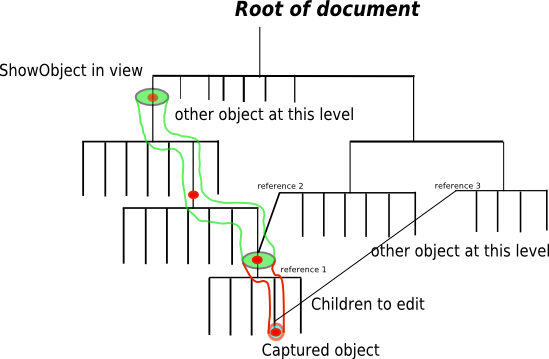
The corridor itself does not include an object that is being edited, it contains all objects leading to the object. The last object in the corridor is the parent of the object being edited. Editing is normally achieved by making a copy of the original object, and from there start editing. This so called edit copy is added to the same parent, which is at the end of the corridor. In fact hit events that started the edit action on the original, are now intercepted by the edit copy. All children of the corridor parent do receive events, but only one processes the mouse events from the editing tool because its the edit copy. Still highlighting objects when the mouse passes over them does work as usual.
How to capture a corridor path
One can set a corridor two ways, captured or not. When not captured, the events are distributed to all children of the a2dCanvasObject set as end of the corridor. The child hit (first) by the mouse will receive the events. When captured, events go only to a specific child, which was set as capturing object. Even if the mouse is not a hit on the object, the event will go to the captured child objects.
Saving a corridor path
In some tools one likes to preserve a set corridor when temporarily pushing a new tool, in order to restore it when the tool is popped. The class a2dCorridor is used for that.
end object in a2dCanvasView
A corridor is found via the m_flags.m_isOnCorridorPath flag, this is enough to track the corridor path in a document. But when traversing the document, it is not clear if a specific object in the corridor is the last object with the flag set or not. To prevent testing all children first in order to get this information, the end object in the corridor is saved in the a2dCanvasView for which the corridor was set.