a2dWidgetButton is a a2dCanvasObject based button in a canvas More...
#include <canwidget.h>
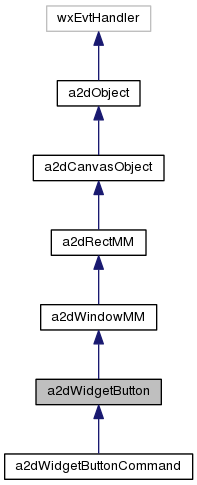
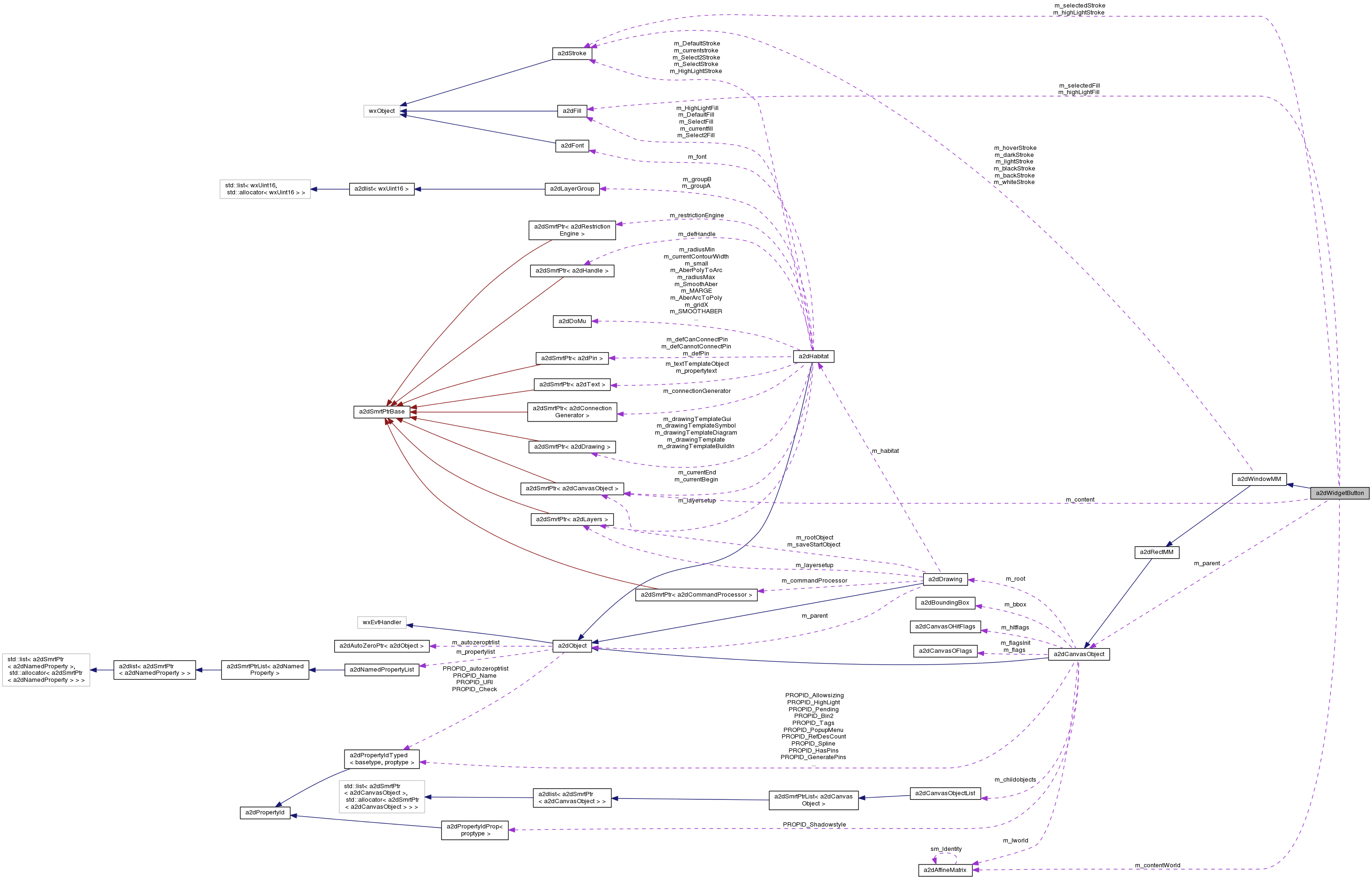
Public Types | |
| enum | WidgetMode { Boundingbox, BoundingboxSize, ScaledContent, ScaledContentKeepAspect } |
 Public Types inherited from a2dWindowMM Public Types inherited from a2dWindowMM | |
| enum | a2dWindowMMStyle { SUNKEN = 0x0001, RAISED = 0x0002 } |
| enum | a2dWindowMMState { NON = 0x0000, DISABLED = 0x0001, SELECTED = 0x0002, FOCUS = 0x0004, HOVER = 0x0008, ALL = 0xFFFF } |
| Public Types inherited from a2dCanvasObject | |
| enum | a2dBboxFlag { a2dCANOBJ_BBOX_NON = 0x0000, a2dCANOBJ_BBOX_EDIT = 0x0001, a2dCANOBJ_BBOX_CHILDREN = 0x0002 } |
| flags for calculating boundingbox of derived object More... | |
| typedef unsigned int | a2dBboxFlags |
| enum | UpdateMode { update_save = 0x0001, update_includebboxprop = 0x0002, updatemask_countObjects = 0x0004, updatemask_save_includebboxprop, updatemask_force, updatemask_normal, updatemask_force_and_count } |
| Various mode flags for Update. More... | |
| Public Types inherited from a2dObject | |
| enum | CloneOptions { clone_members = 0x00000001, clone_properties = 0x00000002, clone_childs = 0x00000004, clone_unused = 0x00000008, clone_setoriginal = 0x00000010, clone_seteditcopy = 0x00000020, clone_noReference = 0x00000040, clone_noCameleonRef = 0x00000080, clone_toDrag = 0x00000100, clone_flat = 0x00000000, clone_deep = clone_members | clone_properties | clone_childs } |
| options for cloning More... | |
| typedef a2dAutoZeroPtr< a2dObject > | TAutoZeroPtrListClass |
| this is needed inside the smart pointer template code | |
Public Member Functions | |
| a2dWidgetButton (a2dCanvasObject *parent, int buttonId, double x, double y, double w, double h, WidgetMode mode=Boundingbox) | |
| Standard constructor. | |
| a2dWidgetButton (const a2dWidgetButton &other, CloneOptions options, a2dRefMap *refs) | |
| ~a2dWidgetButton () | |
| destructor | |
| virtual void | SetParent (a2dCanvasObject *parent) |
| set parent object, this is where events are sent if not handled in this. | |
| virtual wxEvtHandler * | GetParentEvtHandler () |
| get parent object as event handler. | |
| void | SetContentObject (a2dCanvasObject *content) |
| Set the content object. More... | |
| a2dCanvasObject * | GetContentObject () |
| Get the content object,. More... | |
| void | SetContentBorder (double contentBorder) |
| Set the border width around the content. | |
| double | GetContentBorder () |
| Get the border width around the content. | |
| void | SetSelectedStroke (const a2dStroke &selectedStroke) |
| Set the selected stroke style for the button. | |
| void | SetSelectedFill (const a2dFill &selectedFill) |
| Set the selected fill style for the button. | |
| void | SetHighLightStroke (const a2dStroke &highLightStroke) |
| Set the selected stroke style for the button. | |
| void | SetHighLightFill (const a2dFill &highLightFill) |
| Set the selected fill style for the button. | |
| int | GetButtonId () |
| id used for button event. | |
| Public Member Functions inherited from a2dWindowMM | |
| a2dWindowMM (double x, double y, double w, double h) | |
| constructor More... | |
| a2dWindowMM (const a2dPoint2D &p1, const a2dPoint2D &p2) | |
| constructor More... | |
| a2dWindowMM (const a2dBoundingBox &bbox) | |
| constructor More... | |
| a2dWindowMM (const a2dWindowMM &rec, CloneOptions options, a2dRefMap *refs) | |
| void | SetStyle (long style) |
| Set drawing style for window see a2dWindowMMStyle. | |
| long | GetStyle () |
| Get drawing style for window see a2dWindowMMStyle. | |
| void | Init () |
| initialize | |
| virtual void | DoSave (wxObject *parent, a2dIOHandlerXmlSerOut &out, a2dXmlSer_flag xmlparts, a2dObjectList *towrite) |
| write object specific CVGL data | |
| void | DoLoad (wxObject *parent, a2dIOHandlerXmlSerIn &parser, a2dXmlSer_flag xmlparts) |
| load object specific CVG data More... | |
| bool | DoUpdate (UpdateMode mode, const a2dBoundingBox &childbox, const a2dBoundingBox &clipbox, const a2dBoundingBox &propbox) |
| Update derived Object specific things ( mainly boundingbox) More... | |
| Public Member Functions inherited from a2dRectMM | |
| a2dRectMM (double x, double y, double w, double h, double radius=0, double contourwidth=0) | |
| constructor More... | |
| a2dRectMM (const a2dPoint2D &p1, const a2dPoint2D &p2, double radius=0, double contourwidth=0) | |
| constructor More... | |
| a2dRectMM (const a2dBoundingBox &bbox, double radius=0, double contourwidth=0) | |
| constructor More... | |
| a2dRectMM (const a2dRectMM &rec, CloneOptions options, a2dRefMap *refs) | |
| void | SetMin (double minx, double miny) |
| set minimum in x and y | |
| void | SetMax (double maxx, double maxy) |
| set maximum in x and y | |
| void | SetWidth (double w) |
| set width of rectangle More... | |
| void | SetHeight (double h) |
| set height of rectangle More... | |
| double | GetWidth () const |
| return width | |
| double | GetHeight () const |
| return height | |
| void | SetBorder (double width) |
| set the Contour width of the shape | |
| double | GetBorder () const |
| get the Contour width of the shape | |
| void | SetContourWidth (double width) |
| set the Contour width of the shape | |
| double | GetContourWidth () const |
| get the Contour width of the shape | |
| void | SetRadius (double radius) |
| set corner radius of rectangle More... | |
| double | GetRadius () const |
| return radius | |
| virtual a2dVertexList * | GetAsVertexList (bool &returnIsPolygon) const |
| convert to a polygon. More... | |
| a2dCanvasObjectList * | GetAsCanvasVpaths (bool transform=true) const |
| when implemented the object without its children, is converted to More... | |
| bool | GeneratePins (a2dPinClass *toConnectTo, a2dConnectTask task, double x, double y, double margin=0) |
| create pins in derived objects. More... | |
| void | OnHandleEvent (a2dHandleMouseEvent &event) |
| Public Member Functions inherited from a2dCanvasObject | |
| virtual a2dCanvasObjectList * | GetAsPolygons (bool transform=true) const |
| convert to a list of polygons. More... | |
| virtual a2dCanvasObjectList * | GetAsPolylines (bool transform=true) const |
| convert to a list of polylines. More... | |
| void | SetTemplate (bool b=true) |
| void | SetExternal (bool b=true) |
| void | SetUsed (bool b=true) |
| bool | GetTemplate () const |
| bool | GetExternal () const |
| bool | GetUsed () const |
| void | Rotate (double rotation) |
| Rotates this object clockwise. More... | |
| void | SetRotation (double rotation) |
| Sets a rotation of this object. More... | |
| void | Scale (double scalex, double scaley) |
| Scale in x and y ( > zero) More... | |
| void | Mirror (bool x=true, bool y=false) |
| Mirrors this object in x or y orientation. More... | |
| void | SkewX (double angle) |
| Skew in X. More... | |
| void | SkewY (double angle) |
| Skew in Y. More... | |
| const a2dAffineMatrix & | GetTransformMatrix () const |
| get the matrix used to position the object | |
| a2dAffineMatrix | GetTransform () const |
| void | SetTransform (a2dAffineMatrix mat=a2dIDENTITY_MATRIX) |
| void | SetTransformMatrix (const a2dAffineMatrix &mat=a2dIDENTITY_MATRIX) |
| Returns the matrix used to position the object. More... | |
| void | SetTransformMatrix (double xt, double yt, double scalex=1, double scaley=1, double degrees=0) |
| Sets the matrix used to position the object. More... | |
| double | GetPosX () const |
| get x position from affine matrix | |
| double | GetPosY () const |
| get y position from affine matrix | |
| a2dPoint2D | GetPosXY () const |
| get position of object | |
| void | SetPosXY (double x, double y, bool restrict=false) |
| set position to x,y More... | |
| void | SetPosXyPoint (const a2dPoint2D &pos) |
| set position to x,y More... | |
| bool | SetPosXYRestrict (double &x, double &y) |
| set position to x,y but restricted, returns new values More... | |
| void | Translate (double x, double y) |
| relative translate the object to position x,y in world coordinates More... | |
| void | Transform (const a2dAffineMatrix &tworld) |
| transform the object using the given matrix More... | |
| virtual bool | EliminateMatrix () |
| reduce matrix to identity More... | |
| virtual bool | RestrictToObject (a2dIterC &ic, const a2dPoint2D &pointToSnapTo, a2dPoint2D &bestPointSofar, a2dSnapToWhatMask snapToWhat, double thresHoldWorld) |
| called from an a2dRestrictionEngine, to restrict vertexes, lines, object to this object. More... | |
| virtual a2dCanvasObjectList * | GetSnapVpath (a2dSnapToWhatMask snapToWhat) |
| return a vectorpath indicating on which point/segments the object likes to be snapped. More... | |
| virtual a2dVertexArray * | GetAlignmentPoints () |
| Return a list of points to align object with others. More... | |
| a2dBoundingBox | GetAlignmentBbox () |
| calls GetAlignmentPoints() | |
| a2dDrawing * | GetRoot () const |
| get a2dCanvasDocument of the object. More... | |
| void | SetRoot (a2dDrawing *root, bool recurse=true) |
| Sets this object to a a2dCanvasDocument. More... | |
| void | Prepend (a2dCanvasObject *obj) |
| prepend a a2dCanvasObject to the childobjects | |
| void | Append (a2dCanvasObject *obj) |
| append a a2dCanvasObject to the childobjects | |
| void | Insert (size_t before, a2dCanvasObject *obj, bool ignoreReleased=true) |
| insert a a2dCanvasObject to the childobjects | |
| a2dCanvasObjectList * | GetChildObjectList () |
| get the list where the child objects are stored in. More... | |
| const a2dCanvasObjectList * | GetChildObjectList () const |
| a2dCanvasObjectList * | CreateChildObjectList () |
| create and get the list where the child objects are stored in. More... | |
| unsigned int | GetChildObjectsCount () const |
| get number of child objects More... | |
| a2dCanvasObject * | CreateHierarchy (a2dCanvasObjectFlagsMask mask, bool createref=true) |
| object with the same given mask are made into a group. More... | |
| virtual void | RemoveHierarchy () |
| move childs of childs and members which have hierarchy one level up to this object its child list. More... | |
| int | ReleaseChild (a2dCanvasObject *obj, bool backwards=false, bool all=false, bool now=false, bool undoCommands=false) |
| remove the given object from the childobjects More... | |
| bool | ReleaseChildObjects (a2dCanvasObjectFlagsMask mask=a2dCanvasOFlags::ALL) |
| removes and release only from the childobjects the objects with the given mask More... | |
| int | IndexOf (a2dCanvasObject *obj) const |
| returns index of the given a2dCanvasObject in this childobjects | |
| a2dCanvasObject * | Find (const wxString &objectname, const wxString &classname=wxT(""), a2dCanvasObjectFlagsMask mask=a2dCanvasOFlags::ALL, const a2dPropertyId *propid=NULL, const wxString &valueAsString=wxT(""), wxUint32 id=0) const |
| return the object which fits the filter. More... | |
| a2dCanvasObject * | Find (a2dCanvasObject *obj) const |
| return the child object if it is part of this object More... | |
| bool | SwitchChildNamed (const wxString &objectname, a2dCanvasObject *newobject) |
| the object with the given name is released and switched in place to newobject More... | |
| int | CollectObjects (a2dCanvasObjectList *total, const wxString &classname=wxT(""), a2dCanvasObjectFlagsMask mask=a2dCanvasOFlags::ALL, const a2dPropertyId *id=0, const a2dBoundingBox &bbox=wxNonValidBbox) const |
| Copy objects with the right conditions to the total list. More... | |
| void | SetEditable (bool editable) |
| Sets if this object may be edited. More... | |
| bool | GetEditable () const |
| get if the object may be edited | |
| void | SetFixedStyle (bool fixedStyle) |
| Set object to fixed style ot not. | |
| bool | GetFixedStyle () const |
| Get object fixed style setting. | |
| bool | IsEditable () const |
| get if the object may be edited More... | |
| bool | GetSelected () const |
| is the object selected flag set More... | |
| bool | IsSelected () const |
| Is the object selected flag set. More... | |
| void | SetSelected (bool selected) |
| Set the object selected flag if allowed. More... | |
| bool | GetSelected2 () const |
| is the object selected2 flag set More... | |
| void | SetSelected2 (bool selected) |
| Set the object selected2 flag if allowed. More... | |
| bool | GetSelectable () const |
| is the object selectable flag set More... | |
| bool | IsSelectable () const |
| Is the object selectable flag set. More... | |
| void | SetSelectable (bool selectable) |
| Allows to select this object. More... | |
| void | SetDraggable (bool draggable) |
| Sets if this object may be dragged. More... | |
| bool | GetDraggable () const |
| get if the object can be dragged | |
| bool | IsDraggable () const |
| get if the object can be dragged More... | |
| bool | GetSnap () const |
| is snap flag set? | |
| void | SetSnap (bool snap) |
| Sets snap flag. More... | |
| void | SetSnapTo (bool snap) |
| Sets snap_to flag. More... | |
| bool | GetSnapTo () const |
| is snap_to flag set? | |
| virtual void | SetMode (int mode) |
| you may use it to modify rendering of the object depending on setting More... | |
| virtual int | GetMode () const |
| get the rendering mode of the object. | |
| virtual a2dCanvasObject * | StartEdit (a2dBaseTool *tool, wxUint16 editmode, wxEditStyle editstyle=wxEDITSTYLE_COPY, a2dRefMap *refs=NULL) |
| create an editcopy and initialize editing of the editcopy More... | |
| virtual void | EndEdit () |
| cleanup an editcopy object More... | |
| void | ReStartEdit (wxUint16 editmode) |
| to restart editing in a different mode | |
| a2dCanvasObject * | GetOriginal () |
| if this is an editcopy, return the orginal else NULL | |
| a2dHandle * | SetHandlePos (wxString name, double x, double y) |
| set a2dHandle position with the given name | |
| void | CaptureMouse (a2dIterC &ic) |
| redirect all mouse events for the canvas to this object | |
| void | ReleaseMouse (a2dIterC &ic) |
| release the mouse capture for this object | |
| bool | IsCapturedMouse (a2dIterC &ic) const |
| is the mouse captured for this object | |
| bool | GetHasSelectedObjectsBelow () const |
| selected object itself or one of its recursive children | |
| void | SetHasSelectedObjectsBelow (bool value) |
| selected object itself or one of its recursive children | |
| bool | GetHasToolObjectsBelow () const |
| tool object itself or one of its recursive children | |
| void | SetHasToolObjectsBelow (bool value) |
| selected object itself or one of its recursive children | |
| virtual bool | IsTemporary_DontSave () const |
| Check if this is a temporary object, which should not be saved. | |
| wxUint16 | GetLayer () const |
| Returns the layer index where this object is drawn upon. More... | |
| virtual void | SetLayer (wxUint16 layer) |
| set layer index where this object is drawn upon. More... | |
| a2dCanvasObject (double x=0, double y=0) | |
| constructor called by derived objects | |
| a2dCanvasObject (const a2dCanvasObject &other, CloneOptions options, a2dRefMap *refs) | |
| constructor using reference to existing canvas object | |
| a2dCanvasObject * | TClone (CloneOptions options, a2dRefMap *refs=NULL) |
| virtual | ~a2dCanvasObject () |
| destructor called by derived objects | |
| a2dHabitat * | GetHabitat () const |
| virtual void | Initialize () |
| virtual bool | IsRecursive () |
| returns if this object does have nested objects More... | |
| virtual void | MakeReferencesUnique () |
| All direct a2dCanvasObject which are part of this one are made unique. More... | |
| double | GetBboxMinX () |
| get minimum X of the boundingbox in world coordinates relative to its parents More... | |
| double | GetBboxMinY () |
| get minimum Y of the boundingbox in world coordinates relative to its parents More... | |
| double | GetBboxMaxX () |
| get maximum X of the boundingbox in world coordinates relative to its parents More... | |
| double | GetBboxMaxY () |
| get maximum Y of the boundingbox in world coordinates relative to its parents More... | |
| double | GetBboxWidth () |
| get width of the boundingbox in world coordinates relative to its parents More... | |
| double | GetBboxHeight () |
| get height of the boundingbox in world coordinates relative to its parents More... | |
| a2dBoundingBox & | GetBbox () |
| get boundingbox in world coordinates exclusive stroke width relative to its parent More... | |
| virtual a2dBoundingBox | GetUnTransformedBbox (a2dBboxFlags flags=a2dCANOBJ_BBOX_CHILDREN) const |
| Get boundingbox without the affine matrix transform included. More... | |
| a2dBoundingBox | GetCalculatedBoundingBox (int nChildLevels) |
| Like GetBbox, but it always calculcates the bounding box from scratch. More... | |
| a2dBoundingBox | GetMappedBbox (a2dIterC &ic, bool withExtend=true) |
| first translate boundingbox with cworld and recalculate at new position More... | |
| a2dBoundingBox | GetMappedBbox (const a2dAffineMatrix &cworld) |
| first translate boundingbox with cworld and recalculate at new position More... | |
| wxRect | GetAbsoluteArea (a2dIterC &ic, int inflate=2) |
| Get absolute occupied area in the device coordinates. More... | |
| float | GetWorldExtend () const |
| get world extend More... | |
| int | GetPixelExtend () const |
| get pixel extend More... | |
| OVERLAP | GetClipStatus (a2dIterC &ic, OVERLAP clipparent) |
| used for deciding if the object needs to be rendered against the current clipping area of the active drawer. More... | |
| a2dBoundingBox | GetClipBox (a2dIterC &ic) |
| returns boundingbox clipping object if clipping property is set More... | |
| a2dCanvasObject * | ChildIsHitWorld (a2dIterC &ic, a2dHitEvent &hitEvent, bool filterSelectableLayers=false) |
| Do hittest on children. More... | |
| a2dCanvasObject * | IsHitWorld (a2dIterC &ic, a2dHitEvent &hitEvent) |
| If the position (x,y) is within the object return this. More... | |
| void | SetHitFlags (a2dCanvasObjectHitFlags mask) |
| set hit flags More... | |
| a2dCanvasObjectFlagsMask | GetHitFlags () const |
| return hitflags as mask | |
| virtual bool | ProcessCanvasObjectEvent (a2dIterC &ic, a2dHitEvent &hitEvent) |
| Hit objects will receive the event. More... | |
| void | OnCanvasObjectMouseEvent (a2dCanvasObjectMouseEvent &event) |
| default handler for mouse events, sent to the object from the a2dDrawingPart. More... | |
| void | OnChar (wxKeyEvent &event) |
| default handler for character events | |
| void | OnPopUpEvent (a2dCanvasObjectMouseEvent &event) |
| called on Right Down by default. | |
| void | OnEnterObject (a2dCanvasObjectMouseEvent &event) |
| called when the mouse enters the object | |
| void | OnLeaveObject (a2dCanvasObjectMouseEvent &event) |
| called when the mouse leaves the object | |
| void | LeaveInObjects (a2dIterC &ic, a2dHitEvent &hitEvent) |
| void | OnHandleEvent (a2dHandleMouseEvent &event) |
| called if a mouse event occured on a child object, that is a handle | |
| bool | RemoveReleased () |
| child objects which have relesed flag set, are removed as child, called recursive on rleased child objects. | |
| virtual bool | Update (UpdateMode mode) |
| Update the state of the object according to its current position etc. More... | |
| bool | GetPending () const |
| is this object pending for update? More... | |
| virtual void | SetPending (bool pending) |
| set this object pending for update More... | |
| void | AddPending (a2dIterC &ic) |
| search objects ( if nested recursive ) that have the pending flag Set More... | |
| virtual void | DependencyPending (a2dWalkerIOHandler *handler) |
| called by to check if this object becomes pending as a result of other objects More... | |
| virtual void | DependentCommands (a2dCanvasObject *parent, a2dCommand *command) |
| call this when a a2dCommands should result in extra commands, to become part of a parent a2dCommandGroup. More... | |
| void | UpdateViewDependentObjects (a2dIterC &ic) |
| update the transform matrix for objects with property 'PROPID_viewDependent' More... | |
| void | SetVisible (bool visible) |
| set if this object will visible (be rendered or not) More... | |
| bool | GetVisible () const |
| get visibility (rendering depends on layer settings also) | |
| bool | IsVisible () const |
| get visibility (rendering depends on layer settings also) More... | |
| void | SetFill (const a2dFill &fill) |
| Set a fill for the object which will be used instead of the layer fill. More... | |
| a2dFill | GetFill () const |
| void | SetFill (const wxColour &fillcolor, a2dFillStyle style=a2dFILL_SOLID) |
| Set a fill color for the object which will be used instead of the layer fill. More... | |
| void | SetFill (const wxColour &fillcolor, const wxColour &fillcolor2, a2dFillStyle style=a2dFILL_SOLID) |
| Set a fill color for the object which will be used instead of the layer fill. More... | |
| void | SetFillColour (const wxColour &colour) |
| set first colour of fill | |
| wxColour | GetFillColour () const |
| get first colour of fill | |
| void | SetStroke (const wxColour &strokecolor, double width=0, a2dStrokeStyle style=a2dSTROKE_SOLID) |
| Set a stroke for the object which will be used instead of the layer stroke. More... | |
| void | SetStroke (const wxColour &strokecolor, int width, a2dStrokeStyle style=a2dSTROKE_SOLID) |
| Set a stroke for the object which will be used instead of the layer stroke. More... | |
| void | SetStroke (const a2dStroke &stroke) |
| Set stroke using pointer to a stroke. More... | |
| a2dStroke | GetStroke () const |
| void | SetStrokeColour (const wxColour &colour) |
| set first colour of stroke | |
| wxColour | GetStrokeColour () const |
| get first colour of stroke | |
| void | SetDrawerStyle (a2dIterC &ic, a2dStyleProperty *style) |
| sets fill and stroke of object to a2dDrawingPart More... | |
| void | SetChildrenOnSameLayer (bool samelayer) |
| if set children are rendered on the same layer as this object. More... | |
| bool | GetChildrenOnSameLayer () const |
| are children rendered on the same layer as this object? | |
| void | SetViewDependent (a2dDrawingPart *aView, bool viewdependent, bool viewspecific=false, bool onlyinternalarea=false, bool deep=false) |
| set the object view dependent and maybe process all children to set these flags More... | |
| void | SetChildOnlyTranslate (bool onlytranslate) |
| How a child is placed towards its parent object. More... | |
| bool | GetChildOnlyTranslate () const |
| are children rendered using just the translation of the parent or also rotation and scale. | |
| void | SetPreRenderAsChild (bool prerender) |
| If set, this object has a higher priority in rendering than other children objects. More... | |
| bool | GetPreRenderAsChild () const |
| Returns if this object should be rendered before other children objects. | |
| bool | GetFilled () const |
| void | SetFilled (bool filled) |
| set the filled flag to render only outlines More... | |
| bool | GetShowShadow () const |
| If True shadow object is visible (if property is there) | |
| void | SetShowShadow (bool showshadow) |
| If True shadow object is visible (if property is there) | |
| bool | GetResizeOnChildBox () const |
| see SetResizeOnChildBox() | |
| void | SetResizeOnChildBox (bool resizeToChilds) |
| If True resize to child boundingbox. More... | |
| const a2dShadowStyleProperty * | GetShadowStyle () const |
| quick way to get the style property containing Shadow property More... | |
| void | CallDoRender (a2dIterC &ic, OVERLAP clipparent) |
| virtual a2dCanvasObject * | PushInto (a2dCanvasObject *parent) |
| when wanting to traverse hierarchy what level is down here. | |
| virtual a2dCanvasObject * | GetCommandProcessor () |
| virtual a2dLayers * | GetLayerSetup () |
| virtual bool | IsConnect () const |
| return true, if this object is used to connect other object's using rubberband like structures. | |
| virtual bool | IsVirtConnect () const |
| object is a virtual connection (connects invisible with other objects without using wires ) | |
| virtual bool | NeedsUpdateWhenConnected () const |
| used in case of flexible canvas objects (wires). More... | |
| bool | DoConnect () |
| if return true, connection with other object on this object its pins is allowed. More... | |
| void | DoConnect (bool doconnect) |
| If set to true this object may be connected to other object on its pins. More... | |
| bool | CanConnectWith (a2dIterC &ic, a2dCanvasObject *toConnect, bool autocreate) |
| check connect to other object More... | |
| a2dPin * | CanConnectWith (a2dIterC &ic, a2dPin *pin, double margin, bool autocreate) |
| is the given pin close enough to another a2dPin to allow connection? More... | |
| bool | IsConnected (bool needsupdate, a2dCanvasObject *toConnect=0) |
| Is the object connected ( Optinal to specific object ) ? More... | |
| virtual bool | FindConnectedPins (a2dCanvasObjectList &result, a2dPin *pin=NULL, bool walkWires=true, a2dPinClass *searchPinClass=NULL, a2dCanvasObject *isConnectedTo=NULL) |
| Find pins in other object which are connected to this object. More... | |
| bool | FindConnectedWires (a2dCanvasObjectList &result, a2dPin *pin, bool walkWires=true, bool selectedEnds=false, bool stopAtSelectedWire=false, bool addToResult=false) |
| find wires on pins of this objects. More... | |
| bool | GetConnected (a2dCanvasObjectList *connected, bool needsupdate) |
| get connected objects that are connected to this object via its pins. More... | |
| virtual bool | ConnectWith (a2dCanvasObject *parent, a2dCanvasObject *toconnect, const wxString &pinname=wxT(""), double margin=1, bool undo=false) |
| Do connect with another a2dCanvasObject by pinname. More... | |
| virtual bool | ConnectWith (a2dCanvasObject *parent, a2dPin *pin, double margin=1, bool undo=false) |
| Do connect with another a2dCanvasObject by pin pointer. More... | |
| virtual void | ConnectPinsCreateConnect (a2dCanvasObject *parent, a2dPin *pinc, a2dPin *pinother, bool undo=false) |
| connect two pins More... | |
| bool | CleanWires (a2dCanvasObjectFlagsMask mask=a2dCanvasOFlags::ALL) |
| pins one wires to the same kind of wire are removed. | |
| void | ConnectPins (a2dCanvasObject *parent, a2dPin *pinc, a2dPin *pinother, bool undo=false) |
| connect two pins which must be unconnected and at the same position More... | |
| virtual bool | DisConnectWith (a2dCanvasObject *toDisConnect=NULL, const wxString &pinname=wxT(""), bool undo=false) |
| Do Disconnect from another a2dCanvasObject by pin name. More... | |
| virtual bool | DisConnectAt (a2dPin *pin, bool undo=false) |
| Do Disconnect from another a2dCanvasObject by pin pointer. More... | |
| void | ReWireConnected (a2dCanvasObject *parent, bool undo=false) |
| rewire the object to keep connection or to make connection with other objects More... | |
| bool | CreateWiresOnPins (a2dCanvasObject *parent, bool undo, bool onlyNonSelected=false) |
| create wires on pins which do not have wires, but directly are connected to other objects. More... | |
| bool | SetConnectedPending (bool onoff, bool needsupdateonly) |
| set connected pending or not pending More... | |
| bool | HasPins (bool realcheck=false) |
| are there a2dPin derived children More... | |
| a2dPin * | HasPinNamed (const wxString pinName, bool NotConnected=false) |
| are there a2dPin derived children which matches the given pin name? More... | |
| int | GetPinCount () |
| How many a2dPin derived children are there. | |
| virtual bool | GeneratePinsPossibleConnections (a2dPinClass *pinClass, a2dConnectTask task, double x, double y, double margin=0) |
| generates pins on all possible locations where the object can be connected. More... | |
| virtual bool | AdjustPinLocation () |
| Allow change in pin location when wiring things up. | |
| virtual a2dCanvasObject * | GetConnectTemplate (a2dPinClass *mapThis, a2dCanvasObject *other, a2dPinClass *mapOther) const |
| based on the a2dPinClass's of eventually a2dPin's wanted in both objects, a More... | |
| virtual a2dCanvasObject * | CreateConnectObject (a2dCanvasObject *parent, a2dPin *pinThis, a2dPin *pinOther, bool undo=false) const |
| generates a connection object with pins and all. More... | |
| a2dPin * | AddPin (const wxString name, double x, double y, wxUint32 a2dpinFlags, a2dPinClass *pinClass, bool undo=false) |
| add a a2dPin as child More... | |
| void | RemovePins (bool NotConnected=false, bool onlyTemporary=false, bool now=false) |
| Remove all a2dPin children. More... | |
| void | ShowPins (bool onoff) |
| Set a2dPin children visible or not. | |
| void | SetRenderConnectedPins (bool onoff) |
| Calls a2dPin::SetRenderConnected() for all pins. More... | |
| virtual void | ClearAllPinConnections (bool withundo=true) |
| Remove all pin connections by issuing a2dCommand_DisConnectPins commands. More... | |
| virtual a2dCanvasObject * | GetParent () const |
| void | SetIsProperty (bool IsProperty) |
| bool | GetIsProperty () const |
| a2dText * | SetObjectTip (const wxString &tip, double x, double y, double size=30, double angle=0, const a2dFont &font=*a2dDEFAULT_CANVASFONT) |
| quickly set a property name OBJECTTIP More... | |
| void | SetTipWindow (const wxString &tip) |
| quickly set a property a2dTipWindowProperty More... | |
| a2dObject * | GetObjectTip () |
| quickly get first property with name OBJECTTIP | |
| virtual bool | EditProperties (const a2dPropertyId *id, bool withUndo) |
| edit properties of the object More... | |
| void | SetSpecificFlags (bool setOrClear, a2dCanvasObjectFlagsMask which) |
| set all bit flags in object that or true in mask to true or false More... | |
| bool | CheckMask (a2dCanvasObjectFlagsMask mask) const |
| Compares all flags in object to the given mask and return true is the same. | |
| void | SetFlags (a2dCanvasObjectFlagsMask newmask) |
| set bit flags of object (true or false) to given newmask values More... | |
| bool | GetFlag (const a2dCanvasObjectFlagsMask which) const |
| get specific bitflag value | |
| a2dCanvasObjectFlagsMask | GetFlags () const |
| get bitflags as an integer | |
| void | SetBin (bool bin) |
| general flag use at will. More... | |
| bool | GetBin () const |
| general flag use at will. | |
| bool | GetGroupA () const |
| get the groupA flag More... | |
| void | SetGroupA (bool value) |
| set the groupA flag More... | |
| bool | GetGroupB () const |
| get the groupA flag More... | |
| void | SetGroupB (bool value) |
| set the groupA flag More... | |
| bool | GetGeneratePins () const |
| get the GeneratePins flag More... | |
| void | SetGeneratePins (bool value) |
| set the GeneratePins flag More... | |
| void | SetIgnoreSetpending (bool value=true) |
| set IgnoreSetpending flag More... | |
| bool | GetIgnoreSetpending () const |
| get IgnoreSetpending flag More... | |
| void | SetIgnoreLayer (bool value=true) |
| bool | GetIgnoreLayer () const |
| void | SetSubEdit (bool value) |
| bool | GetSubEdit () const |
| void | SetSubEditAsChild (bool value) |
| bool | GetSubEditAsChild () const |
| void | SetShowshadow (bool value) |
| bool | GetShowshadow () const |
| void | SetPushin (bool value) |
| bool | GetPushin () const |
| void | SetBin2 (bool value) |
| bool | GetBin2 () const |
| void | SetPrerenderaschild (bool value) |
| bool | GetPrerenderaschild () const |
| void | SetVisiblechilds (bool value) |
| bool | GetVisiblechilds () const |
| void | SetEditing (bool value) |
| bool | GetEditing () const |
| void | SetEditingRender (bool value) |
| bool | GetEditingRender () const |
| void | SetDoConnect (bool value) |
| bool | GetDoConnect () const |
| void | SetIsOnCorridorPath (bool value) |
| bool | GetIsOnCorridorPath () const |
| void | SetHasPins (bool value) |
| bool | GetHasPins () const |
| void | SetMouseInObject (bool value) |
| bool | GetMouseInObject () const |
| void | SetHighLight (bool value) |
| bool | GetHighLight () const |
| void | SetAlgoSkip (bool value) |
| bool | GetAlgoSkip () const |
| void | foreach_f (void(*fp)(a2dCanvasObject *item)) |
| call fp for each object | |
| void | foreach_mf (void(a2dCanvasObject::*mfp)()) |
| call fp for each object | |
| virtual bool | UserBaseFunction () |
| can be used by the user to implement a function that affects all a2dCanvas derived objects | |
| virtual bool | UserBaseFunctionEx (int function, a2dIOHandler *handler=NULL) |
| can be used by the user to implement a function that affects all a2dCanvas derived objects More... | |
| virtual bool | UserBaseFunctionVar (...) |
| can be used by the user to implement a function using a variable argument list that affects all a2dCanvas derived objects | |
| virtual bool | UserBaseFunctionFormat (wxString format,...) |
| can be used by the user to implement a function using a variable argument list and format string that affects all a2dCanvas derived objects | |
| void | WalkerWithContext (a2dIterC &ic, wxObject *parent, a2dWalkerIOHandlerWithContext &handler) |
| This is used to recursively walk through an object tree. | |
| Public Member Functions inherited from a2dObject | |
| virtual bool | ProcessEvent (wxEvent &event) |
| bool | SearchDynamicEventTable (wxEvent &event) |
| void | Connect (int winid, int lastId, int eventType, wxObjectEventFunction func, wxObject *userData=(wxObject *) NULL, wxEvtHandler *eventSink=(wxEvtHandler *) NULL) |
| bool | Disconnect (int winid, int lastId, wxEventType eventType, wxObjectEventFunction func=NULL, wxObject *userData=(wxObject *) NULL, wxEvtHandler *eventSink=(wxEvtHandler *) NULL) |
| void | ProcessConnectedEvent (wxEvent &event) |
| wxCHECK_VERSION(2,9,0) More... | |
| void | ConnectEvent (wxEventType type, wxEvtHandler *eventSink) |
| bool | DisconnectEvent (wxEventType type, wxEvtHandler *eventSink) |
| bool | DisconnectEventAll (wxEvtHandler *eventSink) |
| Remove all dynamic events in classA, going to classB (eventSink) More... | |
| a2dObject () | |
| constructor | |
| virtual | ~a2dObject () |
| destructor | |
| void | operator= (const a2dObject &other) |
| assignment operator | |
| int | GetOwnedBy () |
| like it to be protected, but this does not work with wxList macros More... | |
| virtual a2dObject * | SetNonDynamic () |
| Call to mark this object as non-dynamic (static/local/auto) More... | |
| void | CheckReferences () |
| Check zero reference count and delete if count is 0. More... | |
| a2dObject * | Clone (CloneOptions options, a2dRefMap *refs=NULL) const |
| create an exact copy of this property | |
| a2dObject (const a2dObject &other, CloneOptions options, a2dRefMap *refs) | |
| virtual wxString | GetName () const |
| Returns the name of this object, if no name is given the internal id will be returned. More... | |
| virtual void | SetName (const wxString &name) |
| Creates the a2dStringProperty PROPID_Name. More... | |
| void | SaveAsDocument (a2dIOHandlerXmlSerOut &out) |
| Save this object and all below as an XML document. More... | |
| virtual void | Save (wxObject *parent, a2dIOHandlerXmlSerOut &out, a2dObjectList *towrite) |
| write all needed to an XML type of file called the CVG format More... | |
| void | LoadFromDocument (a2dIOHandlerXmlSerIn &parser) |
| Load this object and all below from an XML document. More... | |
| virtual void | Load (wxObject *parent, a2dIOHandlerXmlSerIn &parser) |
| load object from CVG file More... | |
| wxInt64 | GetUniqueSerializationId () const |
| return a unique id for this object More... | |
| virtual bool | AlwaysWriteSerializationId () const |
| If true, always write an id. More... | |
| virtual bool | LinkReference (a2dObject *other) |
| link a reference in the object to the given value More... | |
| virtual void | ResolveInform () |
| inform an object that reference resolution was done More... | |
| void | Walker (wxObject *parent, a2dWalkerIOHandler &handler) |
| This is used to recursively walk through an object tree. | |
| void | SetCheck (bool check) |
| general flag use at will. More... | |
| bool | GetCheck () const |
| general flag use at will. | |
| void | SetRelease (bool value) |
| set release flag More... | |
| bool | GetRelease () const |
| get release flag More... | |
| a2dAutoZeroPtr< a2dObject > ** | GetAutoZeroPtrList () |
| return the list head pointer for autozero pointers to this object More... | |
| DECLARE_PROPERTIES () | |
| a2dNamedProperty * | GetProperty (const a2dPropertyId *propertyId, a2dPropertyId::Flags flags=a2dPropertyId::flag_none) const |
| get property on this object More... | |
| void | SetProperty (a2dNamedProperty *propertyHolder, a2dPropertyId::SetFlags flags=a2dPropertyId::set_none) |
| Set the property to the this object. More... | |
| void | SetProperty (const a2dNamedProperty &propertyHolder, a2dPropertyId::SetFlags flags=a2dPropertyId::set_none) |
| Set the property to the this object and if enabled, to all childs and object members. More... | |
| virtual a2dNamedProperty * | FindProperty (const a2dPropertyId *id, a2dPropertyId::Flags flags=a2dPropertyId::flag_none) |
| Find a dynamic property with given id in the property list. More... | |
| virtual const a2dNamedProperty * | FindProperty (const a2dPropertyId *id, a2dPropertyId::Flags flags=a2dPropertyId::flag_none) const |
| Find a dynamic property with given id in the property list. More... | |
| virtual bool | HasProperty (const a2dPropertyId *id, const wxString &stringvalue=wxEmptyString) const |
| Check if the object has a property with given id and string representation. More... | |
| virtual void | OnPropertyChanged (const a2dPropertyId *id) |
| This function is called after a property changed. More... | |
| void | TakeOverProperties (a2dObject *from, a2dPropertyIdList *listOfIds) |
| Properties in the id list are taken from the given object, en set to this. More... | |
| wxURI | GetURI () const |
| quick way to get to PROPID_URI property More... | |
| void | SetURI (const wxURI &url) |
| quickly set a property PROPID_URI More... | |
| const a2dNamedPropertyList & | GetPropertyList () const |
| Get the Property List. More... | |
| bool | HasDynamicProperties () const |
| test if there are dynamic properties in the m_propertylist | |
| virtual bool | RemoveProperty (const a2dPropertyId *id, bool all=true) |
| This function is called by a2dPropertyId to remove a property from the list. More... | |
| void | RemoveTemporaryProperties () |
| remove all temporary properties | |
| virtual bool | AddProperty (a2dNamedProperty *property) |
| This function is called by a2dPropertyId to add a property to the list. More... | |
Protected Member Functions | |
| virtual a2dObject * | DoClone (CloneOptions options, a2dRefMap *refs) const |
| Clone this object and return a pointer to the new object. | |
| void | DoWalker (wxObject *parent, a2dWalkerIOHandler &handler) |
| iterate over this object and its children More... | |
| virtual void | DrawHighLighted (a2dIterC &ic) |
| called by Render() if m_flags.m_HighLight is set More... | |
| virtual void | Render (a2dIterC &ic, OVERLAP clipparent) |
| Render this object to the active a2dDrawingPart. More... | |
| virtual bool | DoUpdate (UpdateMode mode, const a2dBoundingBox &childbox, const a2dBoundingBox &clipbox, const a2dBoundingBox &propbox) |
| Update derived Object specific things ( mainly boundingbox) More... | |
| virtual a2dBoundingBox | DoGetUnTransformedBbox (a2dBboxFlags flags=a2dCANOBJ_BBOX_NON) const |
| In derived object this should be overriden to calculate the boundingbox of the object without its children. More... | |
| virtual void | DoRender (a2dIterC &ic, OVERLAP clipparent) |
| render derived object More... | |
| bool | DoIsHitWorld (a2dIterC &ic, a2dHitEvent &hitEvent) |
| Does hit test on the object (exclusif child objects) More... | |
| void | OnEnterObject (a2dCanvasObjectMouseEvent &event) |
| handler for EVT_CANVASOBJECT_ENTER_EVENT | |
| void | OnLeaveObject (a2dCanvasObjectMouseEvent &event) |
| handler for EVT_CANVASOBJECT_LEAVE_EVENT | |
| void | OnCanvasObjectMouseEvent (a2dCanvasObjectMouseEvent &event) |
| handler for EVT_CANVASOBJECT_MOUSE_EVENT | |
| Protected Member Functions inherited from a2dWindowMM | |
| void | OnEnterObject (a2dCanvasObjectMouseEvent &event) |
| void | OnLeaveObject (a2dCanvasObjectMouseEvent &event) |
| void | DoRender (a2dIterC &ic, OVERLAP clipparent) |
| render derived object More... | |
| Protected Member Functions inherited from a2dRectMM | |
| virtual bool | DoStartEdit (wxUint16 editmode, wxEditStyle editstyle) |
| only used for editable objects and under control of a editing tool. More... | |
| bool | DoIsHitWorld (a2dIterC &ic, a2dHitEvent &hitEvent) |
| Does hit test on the object (exclusif child objects) More... | |
| a2dBoundingBox | DoGetUnTransformedBbox (a2dBboxFlags flags=a2dCANOBJ_BBOX_NON) const |
| In derived object this should be overriden to calculate the boundingbox of the object without its children. More... | |
| Protected Member Functions inherited from a2dCanvasObject | |
| bool | ProcessCanvasEventChild (a2dIterC &ic, RenderChild &whichchilds, a2dHitEvent &hitEvent) |
| bool | ProcessCanvasEventChildOneLayer (a2dIterC &ic, RenderChild &whichchilds, a2dHitEvent &hitEvent) |
| virtual bool | DoIgnoreIfNotMember (const a2dPropertyId &id) |
| bool | ParseCvgTransForm (a2dAffineMatrix &result, a2dIOHandlerXmlSerIn &parser) |
| parse Cvg transform of object | |
| virtual void | DoAddPending (a2dIterC &ic) |
| called by addPending | |
| virtual void | DoEndEdit () |
| only used for editable objects and under control of a editing tool. More... | |
| bool | LocalHit (a2dIterC &ic, a2dHitEvent &hitEvent) |
| a2dCanvasObject * | IsHitWorldChildObjects (a2dIterC &ic, RenderChild &whichchilds, a2dHitEvent &hitEvent) |
| This is an internal function used by IsHitWorld(). Don't use it directly. | |
| a2dCanvasObject * | HitChildObjectsOneLayer (a2dIterC &ic, RenderChild &whichchilds, a2dHitEvent &hitEvent) |
| This is an internal function used by IsHitWorldChildObjects(). Don't use it directly. | |
| const a2dFill & | MX_GetFill () const |
| void | MX_SetFill (const a2dFill &value) |
| const a2dStroke & | MX_GetStroke () const |
| void | MX_SetStroke (const a2dStroke &value) |
| virtual void | DoUpdateViewDependentTransform (a2dIterC &ic) |
| update transform matrix klion: I'm not sure that this function necessary as virtual | |
| virtual void | DoUpdateViewDependentObjects (a2dIterC &ic) |
| update derived objects | |
| virtual void | RenderChildObjects (a2dIterC &ic, RenderChild &whichchilds, OVERLAP clipparent) |
| render only the child objects More... | |
| virtual void | RenderChildObjectsOneLayer (a2dIterC &ic, RenderChild &whichchilds, OVERLAP clipparent) |
| to render the child objects More... | |
| virtual bool | DoCanConnectWith (a2dIterC &ic, a2dPin *pin, double margin, bool autocreate) |
| prepare an object for being connected to a given pin More... | |
| void | OnPropertyChanged (a2dComEvent &event) |
| virtual void | DoWalkerWithContext (a2dIterC &ic, wxObject *parent, a2dWalkerIOHandlerWithContext &handler) |
| Protected Member Functions inherited from a2dObject | |
| virtual bool | DoIgnoreIfNotMember (const a2dPropertyId *id) const |
| used to decide if a property shall be ignored, if it is not a member More... | |
Protected Attributes | |
| a2dStroke | m_selectedStroke |
| a2dFill | m_selectedFill |
| a2dStroke | m_highLightStroke |
| a2dFill | m_highLightFill |
| int | m_buttonId |
| event id used when sending events | |
| WidgetMode | m_mode |
| type of button rendering of the m_content object. | |
| double | m_contentBorder |
| here a border between the button and the content can be given | |
| a2dCanvasObjectPtr | m_content |
| the button its graphics, which will be scaled in WidgetMode::ScaleChildren | |
| a2dCanvasObject * | m_parent |
| events are sent from the button to this object, if not handled by the button itself. | |
| a2dAffineMatrix | m_contentWorld |
| for scaling/translating the m_content | |
| Protected Attributes inherited from a2dWindowMM | |
| long | m_style |
| long | m_state |
| a2dStroke | m_backStroke |
| a2dStroke | m_darkStroke |
| a2dStroke | m_lightStroke |
| a2dStroke | m_whiteStroke |
| a2dStroke | m_blackStroke |
| a2dStroke | m_hoverStroke |
| Protected Attributes inherited from a2dRectMM | |
| double | m_radius |
| radius in case of rounded rectangle (negatif inwards positif outwards) | |
| double | m_contourwidth |
| if != 0 you get a contour around the rectangle ( donut like ). | |
| double | m_minx |
| minimum x of rectangle | |
| double | m_miny |
| minimum of rectangle | |
| double | m_maxx |
| maximum x of rectangle | |
| double | m_maxy |
| maximum y of rectangle | |
| bool | m_flipIn |
| double | m_border |
| border around children towards the rectangle | |
| Protected Attributes inherited from a2dCanvasObject | |
| a2dDrawing * | m_root |
| root group for rendering and accessing the canvas's also contains layer settings | |
| a2dCanvasOFlags | m_flags |
| holds flags for objects | |
| a2dCanvasOHitFlags | m_hitflags |
| allow hits on basis of those flags | |
| a2dBoundingBox | m_bbox |
| boundingbox in world coordinates | |
| float | m_worldExtend |
| world extend in world coordinates. More... | |
| wxUint16 | m_pixelExtend |
| Pixel extend. More... | |
| wxUint16 | m_layer |
| layer of object, default wxLAYER_DEFAULT | |
| a2dAffineMatrix | m_lworld |
| used for positioning the object (x,y,ang,scale etc.) | |
| a2dCanvasObjectList * | m_childobjects |
| holds child objects | |
| Protected Attributes inherited from a2dObject | |
| a2dNamedPropertyList | m_propertylist |
| properties | |
| int | m_refcount |
| how many references to this object do exist | |
| bool | m_check: 1 |
| used for linking multiple referenced objects when serializing | |
| bool | m_release: 1 |
| when set object is treated as being deleted, and wil be deleted in idle time. | |
| bool | m_recursion_active: 1 |
| this is used as a recursion stopper | |
| bool | m_pendingDisconnects: 1 |
| unsigned int | m_iteratorCount |
| a2dAutoZeroPtr< a2dObject > * | m_autozeroptrlist |
| this is a list of all a2dAutoZeroPtr object pointing to this object | |
Additional Inherited Members | |
| Static Public Member Functions inherited from a2dCanvasObject | |
| static void | SetIgnoreAllSetpending (bool value=true) |
| set static IgnoreAllSetpending flag More... | |
| static bool | GetIgnoreAllSetpending () |
| get static IgnoreSetpending flag More... | |
| Static Public Attributes inherited from a2dCanvasObject | |
| static bool | m_ignoreAllSetpending = false |
| when set all SetPending() calss are supressed. | |
| static a2dPropertyIdMatrix * | PROPID_TransformMatrix = NULL |
| static a2dPropertyIdPoint2D * | PROPID_Position = NULL |
| static a2dPropertyIdUint16 * | PROPID_Layer = NULL |
| static a2dPropertyIdBool * | PROPID_Selected = NULL |
| static a2dPropertyIdBool * | PROPID_Selectable = NULL |
| static a2dPropertyIdBool * | PROPID_SubEdit = NULL |
| static a2dPropertyIdBool * | PROPID_SubEditAsChild = NULL |
| static a2dPropertyIdBool * | PROPID_Visible = NULL |
| static a2dPropertyIdBool * | PROPID_Draggable = NULL |
| static a2dPropertyIdBool * | PROPID_Showshadow = NULL |
| static a2dPropertyIdBool * | PROPID_Filled = NULL |
| static a2dPropertyIdBool * | PROPID_GroupA = NULL |
| static a2dPropertyIdBool * | PROPID_GroupB = NULL |
| static a2dPropertyIdBool * | PROPID_GeneratePins = NULL |
| static a2dPropertyIdBool * | PROPID_Bin = NULL |
| static a2dPropertyIdBool * | PROPID_Bin2 = NULL |
| static a2dPropertyIdBool * | PROPID_Pending = NULL |
| static a2dPropertyIdBool * | PROPID_Snap = NULL |
| static a2dPropertyIdBool * | PROPID_SnapTo = NULL |
| static a2dPropertyIdBool * | PROPID_Pushin = NULL |
| static a2dPropertyIdBool * | PROPID_Prerenderaschild = NULL |
| static a2dPropertyIdBool * | PROPID_Visiblechilds = NULL |
| static a2dPropertyIdBool * | PROPID_Editable = NULL |
| static a2dPropertyIdBool * | PROPID_Editing = NULL |
| static a2dPropertyIdBool * | PROPID_EditingRender = NULL |
| static a2dPropertyIdBool * | PROPID_ChildrenOnSameLayer = NULL |
| static a2dPropertyIdBool * | PROPID_DoConnect = NULL |
| static a2dPropertyIdBool * | PROPID_IsOnCorridorPath = NULL |
| static a2dPropertyIdBool * | PROPID_HasPins = NULL |
| static a2dPropertyIdBool * | PROPID_IsProperty = NULL |
| static a2dPropertyIdBool * | PROPID_MouseInObject = NULL |
| static a2dPropertyIdBool * | PROPID_HighLight = NULL |
| static a2dPropertyIdBool * | PROPID_Template = NULL |
| static a2dPropertyIdBool * | PROPID_External = NULL |
| static a2dPropertyIdBool * | PROPID_Used = NULL |
| static a2dPropertyIdBool * | PROPID_Release = NULL |
| static a2dPropertyIdCanvasObject * | PROPID_Begin = NULL |
| static a2dPropertyIdCanvasObject * | PROPID_End = NULL |
| static a2dPropertyIdDouble * | PROPID_EndScaleX = NULL |
| static a2dPropertyIdDouble * | PROPID_EndScaleY = NULL |
| static a2dPropertyIdBool * | PROPID_Spline = NULL |
| static a2dPropertyIdDouble * | PROPID_ContourWidth = NULL |
| static a2dPropertyIdBool * | PROPID_DisableFeedback = NULL |
| static a2dPropertyIdBool * | PROPID_Allowrotation = NULL |
| static a2dPropertyIdBool * | PROPID_Allowsizing = NULL |
| static a2dPropertyIdBool * | PROPID_Allowskew = NULL |
| static a2dPropertyIdBool * | PROPID_IncludeChildren = NULL |
|
static a2dPropertyIdRefObjectAutoZero * | PROPID_Controller = NULL |
| static a2dPropertyIdCanvasObject * | PROPID_Original = NULL |
| static a2dPropertyIdCanvasObject * | PROPID_Editcopy = NULL |
| static a2dPropertyIdCanvasObject * | PROPID_Parent = NULL |
| static a2dPropertyIdCanvasObject * | PROPID_Objecttip = NULL |
| static a2dPropertyIdUint16 * | PROPID_Editmode = NULL |
| static a2dPropertyIdUint16 * | PROPID_Editstyle = NULL |
| static a2dPropertyIdUint16 * | PROPID_Index = NULL |
|
static a2dPropertyIdCanvasShadowStyle * | PROPID_Shadowstyle = NULL |
| static a2dPropertyIdFill * | PROPID_Fill = NULL |
| static a2dPropertyIdStroke * | PROPID_Stroke = NULL |
| static a2dPropertyIdUint32 * | PROPID_RefDesCount = NULL |
| static a2dPropertyIdUint32 * | PROPID_RefDesNr = NULL |
| static a2dPropertyIdBool * | PROPID_ToolDecoration = NULL |
| set for objects that act as tool decorations, when a tool is in action. | |
| static a2dPropertyIdVoidPtr * | PROPID_ToolObject = NULL |
| set for objects that act as tool object, when a tool is in action. | |
| static a2dPropertyIdBool * | PROPID_TemporaryObject = NULL |
| set for objects that do not have to be saved | |
| static a2dPropertyIdBoundingBox * | PROPID_BoundingBox = NULL |
| used to store state ( redraw area) of the object as it was before a change | |
| static a2dPropertyIdColour * | PROPID_StrokeColour = NULL |
| static a2dPropertyIdColour * | PROPID_FillColour = NULL |
| static a2dPropertyIdRefObject * | PROPID_ViewSpecific = NULL |
| static a2dPropertyIdBool * | PROPID_FirstEventInObject = NULL |
| set in Startedit(), to be used to detect first (mouse)event sent to object. | |
| static a2dPropertyIdUint16 * | PROPID_Datatype = NULL |
| used in GDSII and KEY format to specify the DATATYPE of elements More... | |
| static a2dPropertyIdRefObject * | PROPID_ViewDependent = NULL |
| used for objects that depend on 'aView' view when it comes to size. | |
| static a2dPropertyIdMatrix * | PROPID_IntViewDependTransform = NULL |
| used for objects with* PROPID_viewDependent but only for internal area | |
| static a2dPropertyIdDateTime * | PROPID_DateTime = NULL |
| some time property which a user wants to store | |
| static a2dPropertyIdDateTime * | PROPID_ModificationDateTime = NULL |
| static a2dPropertyIdDateTime * | PROPID_AccessDateTime = NULL |
| static a2dPropertyIdMenu * | PROPID_PopupMenu = NULL |
| when set used for popup menu by default in OnPopUpEvent() | |
| static a2dPropertyIdWindow * | PROPID_TipWindow = NULL |
| when set used for tip window by default in OnCanvasMouseEvent() | |
| static a2dPropertyIdTagVec * | PROPID_Tags = NULL |
| used in tool when grouping using tags | |
| Static Public Attributes inherited from a2dObject | |
| static a2dPropertyIdBool * | PROPID_Check = NULL |
| used for linking multiple referenced objects when serializing | |
| static a2dPropertyIdUri * | PROPID_URI = NULL |
| attach an URL to the object | |
| static a2dPropertyIdString * | PROPID_Name = NULL |
| Name property, to return name of this object. | |
| static a2dPropertyIdVoidPtr * | PROPID_autozeroptrlist = NULL |
| static const a2dSignal | sm_Edit_properties = wxNewId() |
| edit properties event, see EditProperties() | |
| Protected Types inherited from a2dObject | |
| enum | { refcount_nondynamic = 0x76543210 } |
| special refcount value for non-dynamic objects | |
| Static Protected Attributes inherited from a2dCanvasObject | |
| static a2dCanvasOFlags | m_flagsInit |
| holds value for flags to initialize m_flags More... | |
Detailed Description
a2dWidgetButton is a a2dCanvasObject based button in a canvas
a2dWidgetButton implements a a2dCanvasObject based button. This is usefull for selecting objects from a a2dCanvas that is used as a palette of objects, styles or tools. If the object is selected, it is drawn with the styles set by SetSelectedStroke and SetSelectedFill. Otherwise it is drawn by the usual style for this object. The default selected style is a one pixel black line and white fill. The default non-selected style is transparent stroke and fill.
a2dWidgetButton does not need a tool. It processes Mouse events. Events are first processed by the class itself, and if not handled, redirected to m_parent. You can also connect dynamically to the wxEvtHandler which is a base class.
Definition at line 43 of file canwidget.h.
Member Enumeration Documentation
Definition at line 48 of file canwidget.h.
Member Function Documentation
|
protectedvirtual |
In derived object this should be overriden to calculate the boundingbox of the object without its children.
The default return a non Valid boundingbox.
The real boundingbox of the object is often less desirable for editing. e.g. a rectangle with a contour, one does not want editing handles on the contour, instead they should still be on the basic rectangle.
Reimplemented from a2dCanvasObject.
Definition at line 196 of file canwidget.cpp.
|
protectedvirtual |
Does hit test on the object (exclusif child objects)
DoIsHitWorld() should return the way the object is hit by filling a2dHitEvent::m_how with the correct info.
- Parameters
-
ic iterative context ( e.g. current transform WITH the local transform applied ) hitEvent stores hit information
- Returns
- true if hit
Reimplemented from a2dCanvasObject.
Definition at line 311 of file canwidget.cpp.
render derived object
if the object has sub objects (apart from the childobject which are handled here), those subobject most rendered by iterating on layer when needed/wanted, simular to child objects. We do not iterate here, since that is only needed if indeed there or subobjects. This will be know in a "wxDerivedCanvasObject DoRender".
SO parent objects that call this function, must:
\li 1-  clip object against area to redraw.
\li 2-  iterate on layers when needed.
A a2dCanvasObject is rendered as a + (plus sign) when there or no children.
Reimplemented from a2dCanvasObject.
Definition at line 243 of file canwidget.cpp.
|
protectedvirtual |
Update derived Object specific things ( mainly boundingbox)
Calculates the boundingbox of the object (exclusif base class child objects but with other nested objects).
- Parameters
-
mode way to update the objects childbox size of children boundingbox clipbox clip to this propbox size of properties boundingbox
- Remarks
- in a derived class this function can also be used to update object specific cache data.
- force may or may not have direct influence on the object itself, if this function is called directly for some reason (e.g from derived objects), you must invalidate the boudingbox yourself. GetDrawerBox()->SetValid( false );
Reimplemented from a2dCanvasObject.
Definition at line 135 of file canwidget.cpp.
|
protectedvirtual |
iterate over this object and its children
This function allows you to extend the functionality of all a2dCanvasObject classes in a a2dCanvasDocument, without adding extra members to these objects.
Default functions are called on the a2dWalkerIOHandler, which redirect the calls to other functions based on this object its classname. On can register classes to a2dWalkerIOHandler or derived classes. This way for each unique object in the document there can be a function in a2dWalkerIOHandler.
- Returns
- false if some object did not have a function attached via a2dWalkerIOHandler.
See a2dWalkerIOHandler for more.
Reimplemented from a2dCanvasObject.
Definition at line 81 of file canwidget.cpp.
|
protectedvirtual |
called by Render() if m_flags.m_HighLight is set
- Parameters
-
ic iteration context (has a2dDrawingPart accumulative matrix to calculate absolute position of the object)
Reimplemented from a2dCanvasObject.
Definition at line 92 of file canwidget.cpp.
|
inline |
Render this object to the active a2dDrawingPart.
This function is called via the a2dCanvasDocument class or its nested children. The active a2dDrawingPart which is set for the document is used to draw to (either on its buffer or directly on the device) All rendering goes through this function to be able to render specific things in the base class first (like a2dCanvasObject its properties.) Somewhere internal DoRender will be called to really render the derived object itself. Next to that nested a2dCanvasObject's will be rendered too.
If wanted only the canvas objects with a certain mask set, will be rendered. Mask example: Checking visible and selected
use: mask=(a2dCANOBJ_VISIBLE | a2dCANOBJ_SELECTED)
- Remarks
- Do not use directly from outside the containing document of this object. Normally only used directly in derived classes
- See Also
- a2dCanvasDocument
- Remarks
- The active clipping rectangle is set within the active drawer. It can be used to decide which parts of the object need to be re-drawn or not. This may speed up drawing in sepcial cases, but in general the active a2dDrawingPart, simply clips all that is drawn on it to active clipping rectangle. The fact that the object is called to redrawn itself, is not decided here, instead it is part of the pending object mechanism. Which uses the object its boundingbox to request redrawing.
- Normally an object will be rendered if the given layer is equal to the object its layer.
- wxLAYER_ALL has a special meaning. If the given input layer is wxLAYER_ALL, then the m_layer of objects is not tested. So the child objects their own layer settings are ignored/not checked in that case. All child objects are drawn at once, still the style of the layers settings is used when needed.
If the flag "m_flags.m_childrenOnSameLayer" is set, a new iteration over layers will take place. The effect is that all children will be drawn at once ( not only objects on the given layer ), but the order of the layers will be taken into account to draw the children. If the flag "m_flags.m_childrenOnSameLayer" is NOT set, a new iteration on layers is NOT done, and only the objects on the given layer will be drawn.
- Remarks
- ic.GetPerLayerMode() is true, then only ic.GetLayer() is rendered, which can not be wxLAYER_ALL.
- Parameters
-
ic iteration context (has a2dDrawingPart accumulative matrix to calculate absolute position of the object) clipparent this must be the clip status of parent object, it is used to optimize drawing speed. e.g If parent is completely within the current clipping rectangle of the a2dDrawingPart, there is no need to check child objects.
Reimplemented from a2dCanvasObject.
Definition at line 128 of file canwidget.cpp.
|
inline |
Set the content object.
child objects can be added to a button, but they will always be drawn unscaled, independent of WidgetMode. Therefore one can not fit the children inside of the boundingbox of the button. It is important to be able to split normalized content from child objects, for example when object tips that are added to the button. Such an object tip should never be scaled, when the button itself is resized. So the prefered manner of setting the drawing for a button is using SetContentObject(). Children should be used for decorating the button itself, not for fitting/scaling the inside drawing of the button.
Definition at line 80 of file canwidget.h.
Member Data Documentation
|
protected |
- See Also
- SetSelectedFill
Definition at line 146 of file canwidget.h.
|
protected |
- See Also
- SetSelectedStroke
Definition at line 143 of file canwidget.h.
|
protected |
- See Also
- SetSelectedFill
Definition at line 140 of file canwidget.h.
|
protected |
- See Also
- SetSelectedStroke
Definition at line 137 of file canwidget.h.
The documentation for this class was generated from the following files: